ドメインマッピングの設定方法 (v2)
重要な注意: この記事は Ultimate Multisite バージョン 2.x を対象としています。
プレミアムネットワークの最も強力な機能のひとつは、クライアントが自分のサイトにトップレベルドメインを紐づけられることです。結局、どちらがよりプロらしく見えるでしょうか。joesbikeshop.yournetwork.com それとも joesbikeshop.com でしょうか。そのため Ultimate Multisite では、サードパーティ製プラグインを使わなくても、この機能を標準で提供しています。
ドメインマッピングとは?
名前のとおり、ドメインマッピングとは、カスタムドメインへのリクエストを受け取り、そのドメインが紐づけられたネットワーク内の該当サイトへ対応付ける Ultimate Multisite の機能です。
Ultimate Multisite ネットワークでドメインマッピングを設定する方法
ドメインマッピングを動作させるには、いくつかの設定が必要です。ありがたいことに、Ultimate Multisite が手間のかかる作業を自動化するため、要件を簡単に満たせます。
Ultimate Multisite のインストール中、ウィザードは sunrise.php を指定フォルダーへ自動的にコピーしてインストールします。この手順が完了するまで、ウィザードは先へ進ませません。
つまり、Ultimate Multisite のインストールウィザードがネットワークの設定を完了すれば、すぐにカスタムドメインのマッピングを開始できます。
Ultimate Multisite のドメインマッピングは必須ではありません。WordPress Multisite 標準のドメインマッピング機能、または他のドメインマッピングソリューションを使用する選択肢もあります。
他のドメインマッピングソリューションを使うために Ultimate Multisite のドメインマッピングを無効化する必要がある場合は、Ultimate Multisite > 設定 > ドメインマッピング でこの機能を無効化できます。
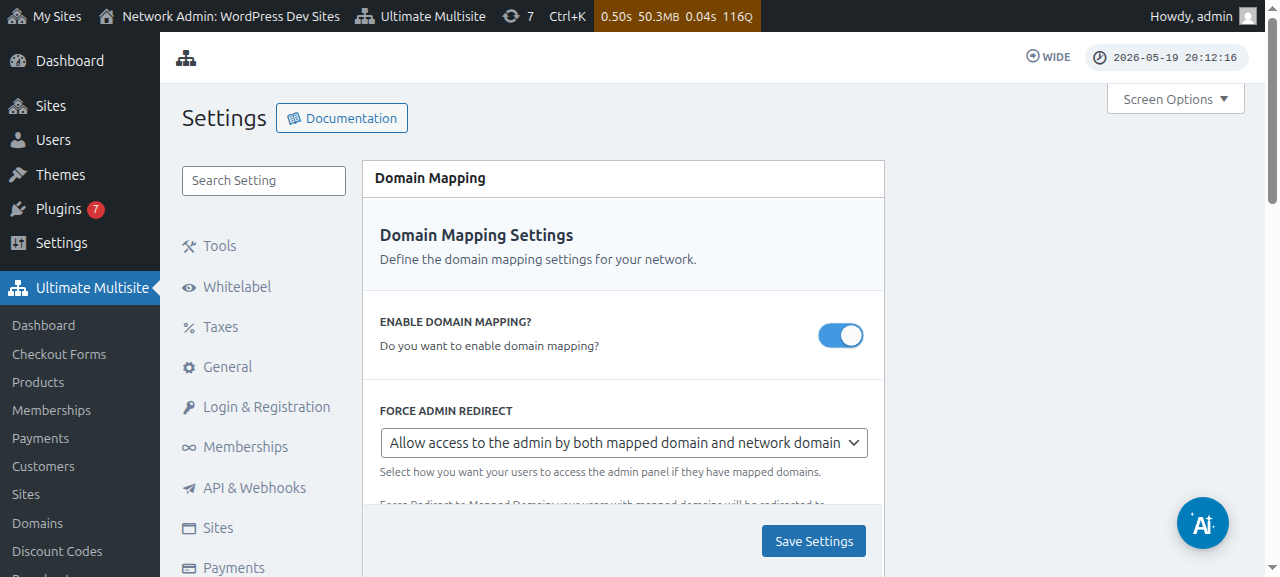
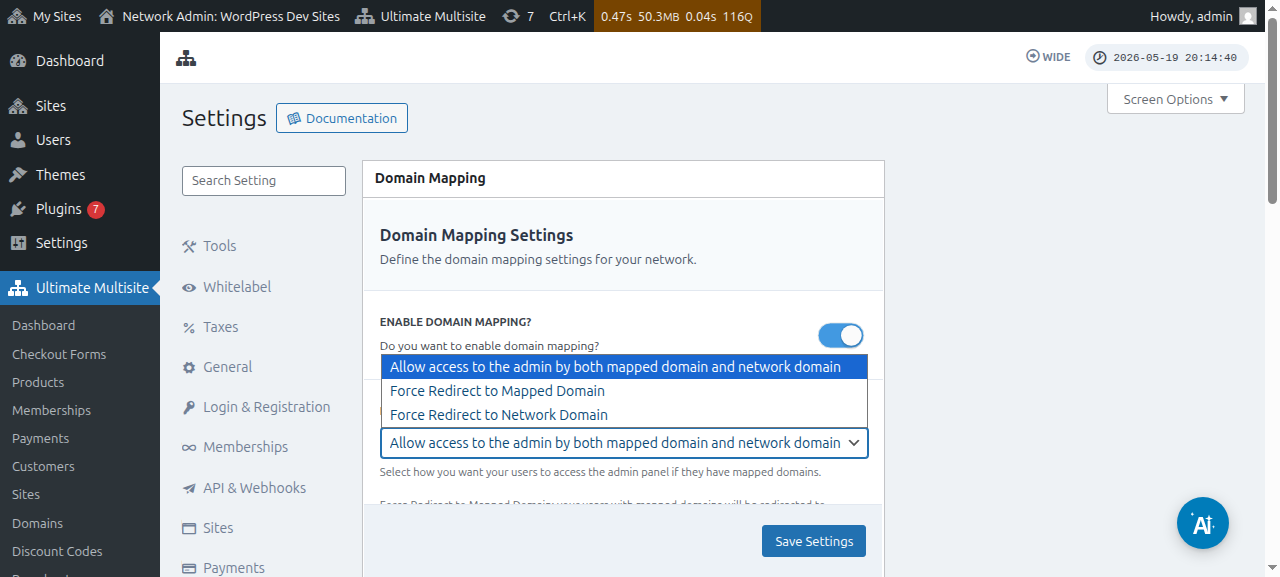
このオプションのすぐ下には、Force Admin Redirect オプションもあります。このオプションでは、顧客がカスタムドメインとサブドメインの両方で管理 Dashboard にアクセスできるか、どちらか一方だけにするかを制御できます。
Force redirect to mapped domain を選択すると、顧客はカスタムドメインでのみ管理 Dashboard にアクセスできます。
Force redirect to network domain オプションはその正反対です。顧客がカスタムドメインでサインインしようとしても、サブドメインでのみ Dashboard へのアクセスが許可されます。
そして Allow access to the admin by both mapped domain domain and network domain オプションでは、サブドメインとカスタムドメインの両方で管理 Dashboard にアクセスできます。
カスタムドメインをマッピングする方法は2つあります。ひとつ目は、スーパー管理者としてネットワーク管理 Dashboard からドメイン名をマッピングする方法です。ふたつ目は、サブサイトの管理 Dashboard の Account ページから行う方法です。
ただし、ネットワーク内のいずれかのサブサイトにカスタムドメインをマッピングし始める前に、そのドメイン名の DNS 設定 が正しく構成されていることを確認する必要があります。
ドメインの DNS 設定が正しく構成されていることを確認する
マッピングを機能させるには、マッピングしようとしているドメインがネットワークの IP アドレスを指していることを確認する必要があります。必要なのはネットワークの IP アドレス、つまり Ultimate Multisite がインストールされているドメインの IP アドレスであり、マッピングしたいカスタムドメインの IP アドレスではありません。特定のドメインの IP アドレスを調べるには、たとえば Site24x7 の利用をおすすめします。
ドメインを正しくマッピングするには、DNS 設定に、その IP アドレス を指す A RECORD を追加する必要があります。DNS 管理はドメイン登録事業者によって大きく異なりますが、XXXX をご利用のドメイン登録事業者に置き換えて「 XXXX で A Record を作成 」のように検索すれば、オンラインに多くのチュートリアルがあります(例: 「 GoDaddy で A Record を作成 」)。
うまく動作させるのが難しい場合は、ドメイン登録事業者のサポートに連絡してください。この部分について支援してもらえます。
クライアントが自分のドメインをマッピングできるようにする予定なら、この部分の作業はクライアント自身が行う必要があります。A Record を作成できない場合は、登録事業者のサポート窓口を案内してください。
Super Admin としてカスタムドメイン名をマッピングする
ネットワークでスーパー管理者としてログインしている場合、Ultimate Multisite > Domains に移動すると、カスタムドメイン名を簡単に追加および管理できます。
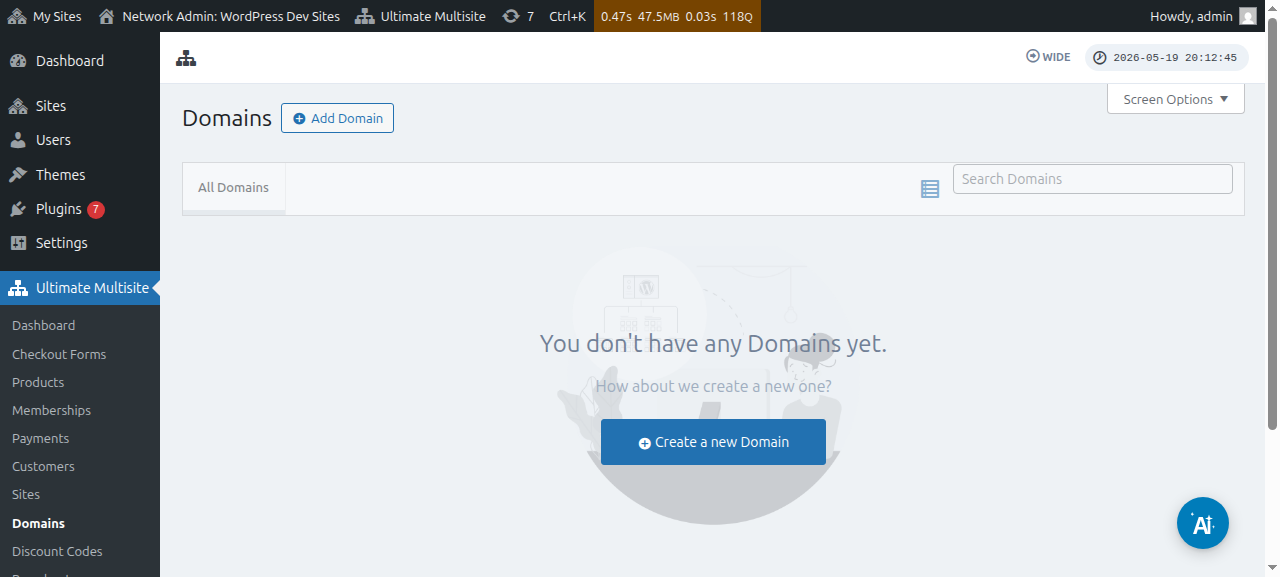
このページでは、上部の Add Domain ボタンをクリックできます。するとモーダルウィンドウが表示され、カスタムドメイン名、そのカスタムドメイン名を適用したい サブサイト を設定して入力し、それを プライマリドメイン 名として設定するかどうかを決められます(1つのサブサイトに複数のドメイン名をマッピングできる点に注意してください)。
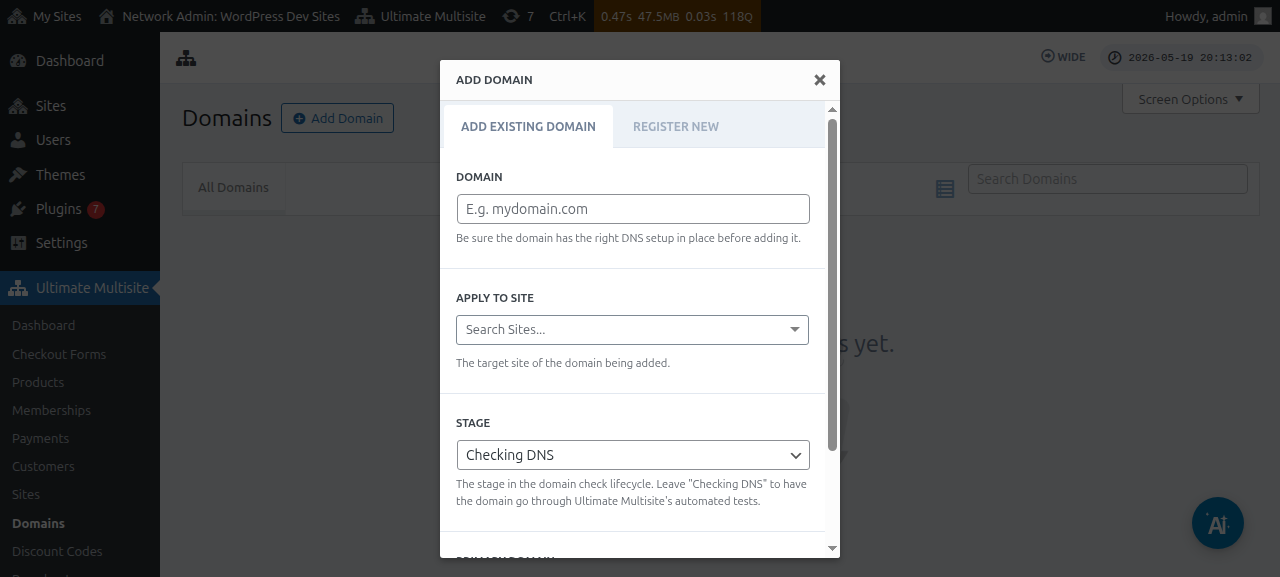
すべての情報を入力したら、下部の Add Existing Domain ボタンをクリックできます。
これにより、カスタムドメインの DNS 情報を確認して取得する処理が開始されます。ページ下部にはログも表示され、進行中の処理を追跡できます。この処理が完了するまで数分かかる場合があります。
Ultimate Multisite v2.13.0 では、サイト単位のドメインとして扱うべきホスト上に新しいサイトが作成されたとき、内部ドメインレコードも自動で作成されます。ホストがネットワークのプライマリドメインである場合、または サイトURL フィールドで設定された共有チェックアウトフォーム用のベースドメインのいずれかである場合は、自動的なマップ済みドメインレコードの作成はスキップされ、その共有ベースドメインを使用するすべてのサイトで引き続き利用できます。
顧客が Domain Seller v1.3.0 以降で新しいドメインを登録すると、Ultimate Multisite は既定で、登録されたドメインを顧客のネットワークサイトに自動でマッピングします。管理者は、プライマリドメインのフラグ、有効化状態、SSL の扱いなどのオプションを調整したい場合を除き、登録成功後に別のマップ済みドメインレコードを追加する必要はなくなりました。
すべてが正しく設定されていれば、ステージ またはステータスは DNS確認中 から 準備完了 に変わるはずです。
ドメイン名をクリックすると、その中にいくつかのオプションが表示されます。簡単に見てみましょう。
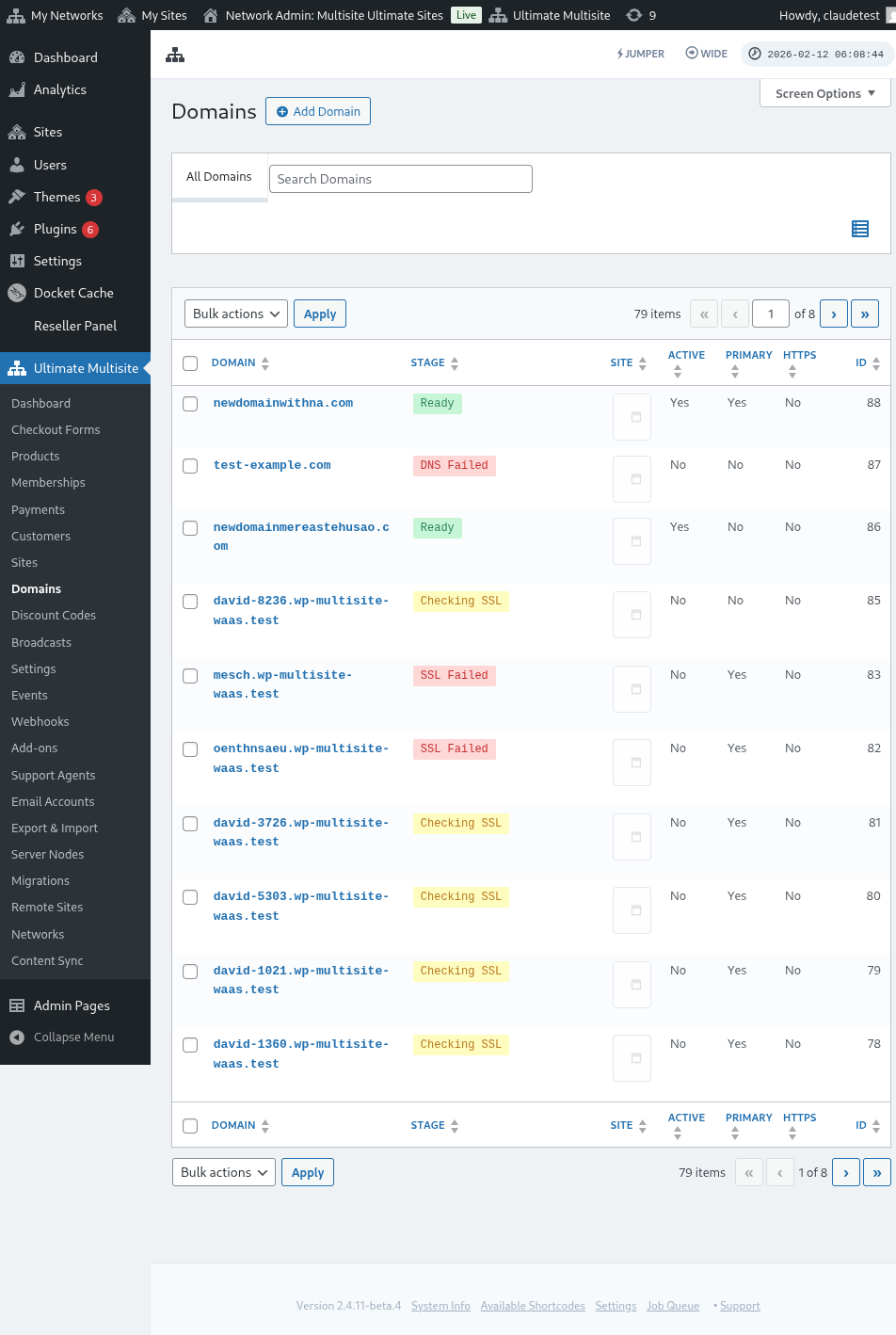
ステージ: これはドメインが現在どの段階にあるかを示します。ドメインを最初に追加したときは、おそらく DNS確認中 ステージになります。この処理では DNS エントリーを確認し、それらが正しいことを検証します。その後、ドメインは SSL確認中 ステージに移ります。Ultimate Multisite はドメインに SSL があるかどうかを確認し、ドメインを 準備完了 または 準備完了(SSLなし) に分類します。
サイト: このドメインに関連付けられているサブドメインです。マップ済みドメインには、この特定のサイトのコンテンツが表示されます。
有効: このオプションをオンまたはオフに切り替えて、ドメインを有効化または無効化できます。
プライマリドメインですか?: 顧客は各サイトに対して複数のマップ済みドメインを持つことができます。この特定のサイトのプライマリドメインにするかどうかを選択するには、このオプションを使用します。
安全ですか?: Ultimate Multisite はドメインを有効にする前に SSL 証明書があるかどうかを確認しますが、SSL 証明書ありまたはなしでドメインを読み込むよう手動で選択できます。Webサイトに SSL 証明書がない状態で SSL を強制して読み込もうとすると、エラーが発生する可能性があることに注意してください。
Subsite ユーザーとしてカスタムドメイン名をマッピングする
Subsite の管理者も、自分の Subsite 管理画面からカスタムドメイン名をマッピングできます。
まず、ドメインマッピング 設定でこのオプションを有効にしていることを確認する必要があります。下のスクリーンショットを参照してください。
このオプションは、プラン レベル、または Ultimate Multisite > 製品 の製品オプションでも設定または構成できます。
これらのオプションのいずれかが有効で、Subsite ユーザーがカスタムドメイン名をマッピングできる場合、Subsite ユーザーには Account ページの下に ドメイン というメタボックスが表示されるはずです。
ユーザーが ドメインを追加 ボタンをクリックすると、いくつかの手順が記載されたモーダルウィンドウが表示されます。
その後、ユーザーは 次のステップ をクリックして、カスタムドメイン名の追加に進めます。また、これをプライマリドメインにするかどうかも選択できます。
ドメインを追加 をクリックすると、カスタムドメインの DNS 情報を検証して取得する処理が開始されます。
ドメイン同期について
ドメイン同期とは、Ultimate Multisite がカスタムドメイン名をアドオンドメインとしてホスティングアカウントに追加し、ドメインマッピングが機能するようにする 処理です。
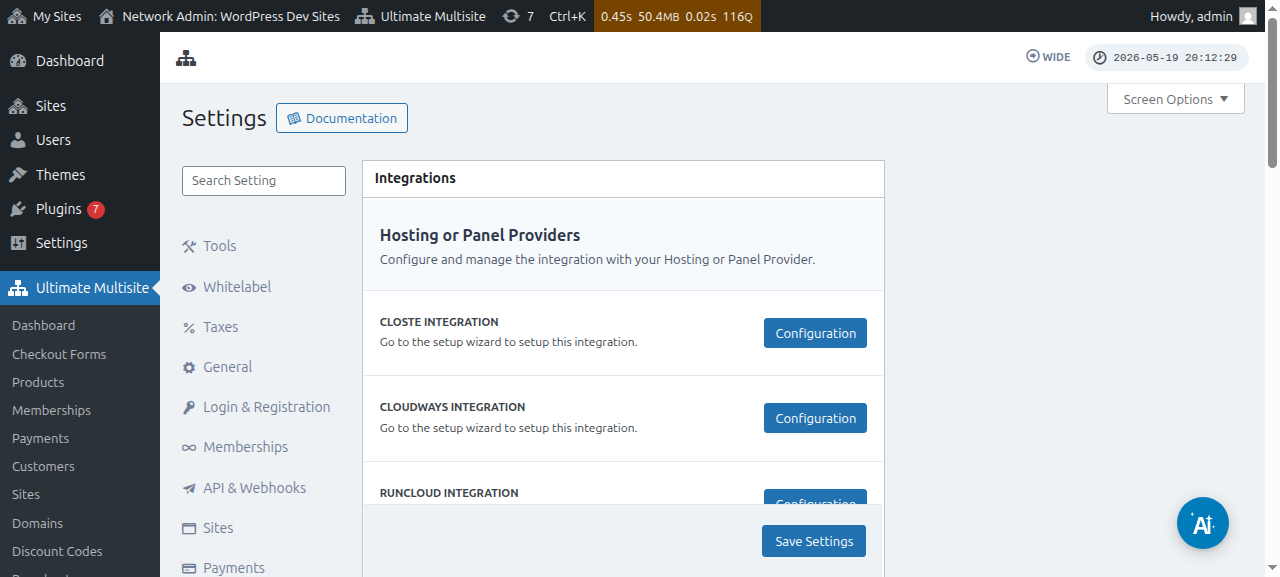
ホスティングプロバイダーが Ultimate Multisite のドメインマッピング機能と連携している場合、ドメイン同期は自動で行われます。現在、対応しているホスティングプロバイダーは Runcloud、Closte、WP Engine、Gridpane、WPMU Dev、Cloudways、 および Cpanel です。
ホストプロバイダー連携が有効な場合、Ultimate Multisite は新しく作成されたサイトに対して、プロバイダー側の DNS またはサブドメイン作成タスクをキューに追加することもできます。そのタスクを受け取る連携がない場合は、何もしないキュー項目を避けるため、バックグラウンドジョブはスキップされます。マップ済みドメインの DNS と SSL の確認は、通常のドメインステージ処理を通じて引き続き実行されます。
この連携は、Ultimate Multisite 設定の 連携 タブで有効化する必要があります。
ホスティングプロバイダーが上記のいずれにも該当しない場合は、ドメイン名をホスティングアカウントに手動で同期または追加する必要があります。