Yuav Teeb Domain Mapping Li Cas (v2)
LUS CEEB TOOM TSEEM CEEB: Tsab ntawv no hais txog Ultimate Multisite version 2.x.
Ib qho ntawm cov feature muaj zog tshaj plaws ntawm ib lub network premium yog qhov peev xwm muab sijhawm rau peb cov client txuas ib lub domain theem-siab rau lawv cov site. Thaum kawg, qhov twg zoo li professional dua: joesbikeshop.yournetwork.com los yog joesbikeshop.com? Yog li ntawd Ultimate Multisite thiaj muab feature ntawd tso nrog lawm, tsis tas yuav siv third-party plugins.
Domain mapping yog dab tsi?
Raws li lub npe qhia, domain mapping yog qhov peev xwm uas Ultimate Multisite muab los txais ib qho kev thov rau custom domain thiab map qhov kev thov ntawd mus rau site uas phim hauv network uas tau txuas nrog domain ntawd.
Yuav teeb domain mapping rau koj Ultimate Multisite Network li cas
Domain mapping yuav tsum muaj qee qhov kev teeb tsa ntawm koj sab kom nws ua haujlwm. Hmoov zoo, Ultimate Multisite automate cov haujlwm nyuaj rau koj kom koj thiaj ua tau raws li cov kev xav tau yooj yim.
Thaum tab tom installation Ultimate Multisite, tus wizard yuav copy thiab install sunrise.php mus rau folder uas tau xaiv cia lawm. Tus wizard yuav tsis cia koj mus ntxiv txog thaum kauj ruam no tiav.
Qhov no txhais tau tias thaum Ultimate Multisite installation wizard teeb koj lub network tiav lawm, koj tuaj yeem pib map custom domain tam sim ntawd.
Nco ntsoov tias domain mapping hauv Ultimate Multisite tsis yog yam yuav tsum tau ua. Koj muaj kev xaiv siv WordPress Multisite native domain mapping function los yog lwm yam domain mapping solution.
Yog koj xav disable Ultimate Multisite domain mapping kom qhib kev rau lwm yam domain mapping solutions, koj tuaj yeem disable feature no hauv Ultimate Multisite > Kev Teeb Tsa > Domain Mapping.
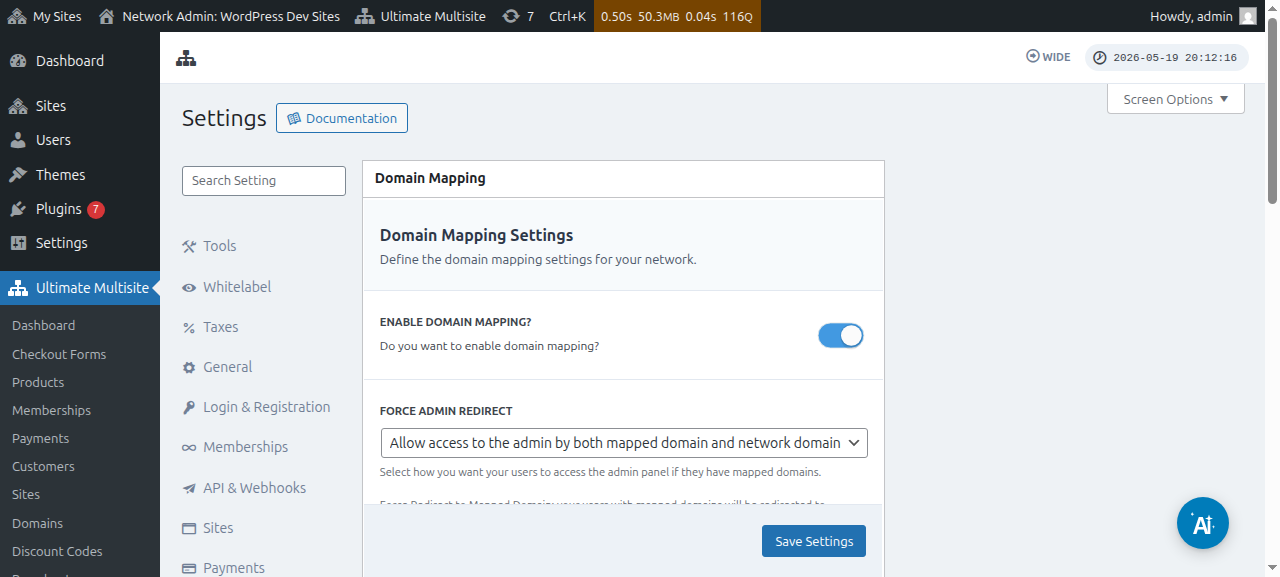
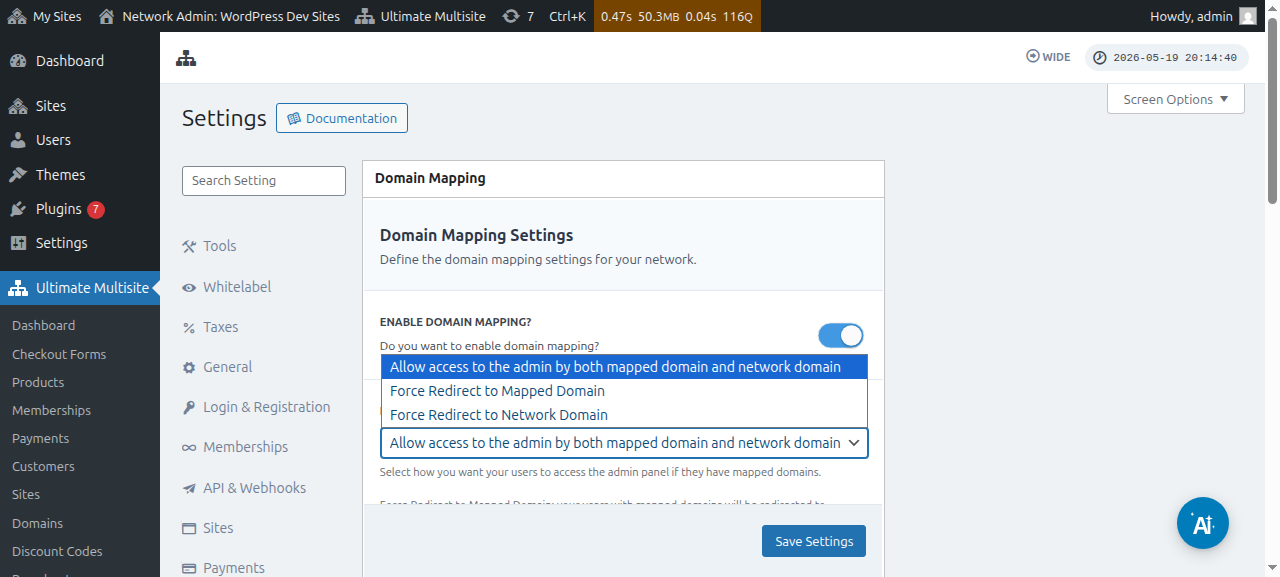
Nyob ncaj qha hauv qab option no, koj kuj pom tau option Yuam Admin Redirect. Option no cia koj tswj seb koj cov customer puas yuav nkag tau rau lawv lub admin Dashboard ob qho tib si ntawm lawv custom domain thiab subdomain, los yog tsuas yog ib qho xwb.
Yog koj xaiv Yuam redirect mus rau mapped domain , koj cov customer tsuas nkag tau rau lawv lub admin Dashboard ntawm lawv cov custom domain xwb.
Option Yuam redirect mus rau network domain yuav ua qhov rov qab kiag - koj cov customer tsuas raug tso cai nkag tau rau lawv cov Dashboard ntawm lawv subdomain xwb, txawm lawv sim sign in ntawm lawv cov custom domain los xij.
Thiab option Tso cai nkag mus rau admin los ntawm ob qho mapped domain thiab network domain cia lawv nkag tau rau lawv cov admin Dashboard ob qho tib si ntawm subdomain thiab custom domain.
Muaj ob txoj kev los map ib lub custom domain. Thawj txoj yog map domain name los ntawm koj lub network admin Dashboard raws li tus super admin thiab txoj thib ob yog dhau ntawm subsite admin Dashboard hauv qab nplooj account.
Tab sis ua ntej koj pib map custom domain rau ib qho subsite hauv koj lub network, koj yuav tsum xyuas kom meej tias DNS settings ntawm domain name raug configure kom raug.
Xyuas kom meej tias domain DNS settings raug configure kom raug
Kom ib qho mapping ua haujlwm, koj yuav tsum xyuas kom meej tias domain uas koj npaj yuav map yog pointing mus rau koj Network tus IP address. Nco ntsoov tias koj xav tau Network IP address - IP address ntawm domain uas Ultimate Multisite raug install - tsis yog IP address ntawm custom domain uas koj xav map. Piv txwv, kom nrhiav IP address ntawm ib lub domain tshwj xeeb, peb pom zoo kom mus rau Site24x7.
Kom map domain kom raug, koj yuav tsum ntxiv ib qho A RECORD hauv koj qhov DNS configuration uas pointing mus rau IP address ntawd. Kev tswj DNS sib txawv heev ntawm cov domain registrar sib txawv, tab sis muaj ntau tutorial online uas piav txog qhov ntawd yog koj nrhiav " Creating A Record on XXXX " uas XXXX yog koj tus domain registrar (piv txwv: " Creating A Record on GoDaddy ").
Yog koj muaj teeb meem ua kom qhov no ua haujlwm, hu rau koj tus domain registrar support thiab lawv yuav pab tau koj nrog feem no.
Yog koj npaj cia koj cov client map lawv tus kheej cov domain, lawv yuav tsum ua haujlwm ntawm feem no lawv tus kheej. Qhia lawv mus rau lawv tus registrar support system yog lawv tsis muaj peev xwm tsim A Record.
Map custom domain name raws li Super Admin
Thaum koj logged in ua super admin hauv koj lub network, koj tuaj yeem ntxiv thiab tswj custom domain names yooj yim los ntawm kev mus rau Ultimate Multisite > Domains.
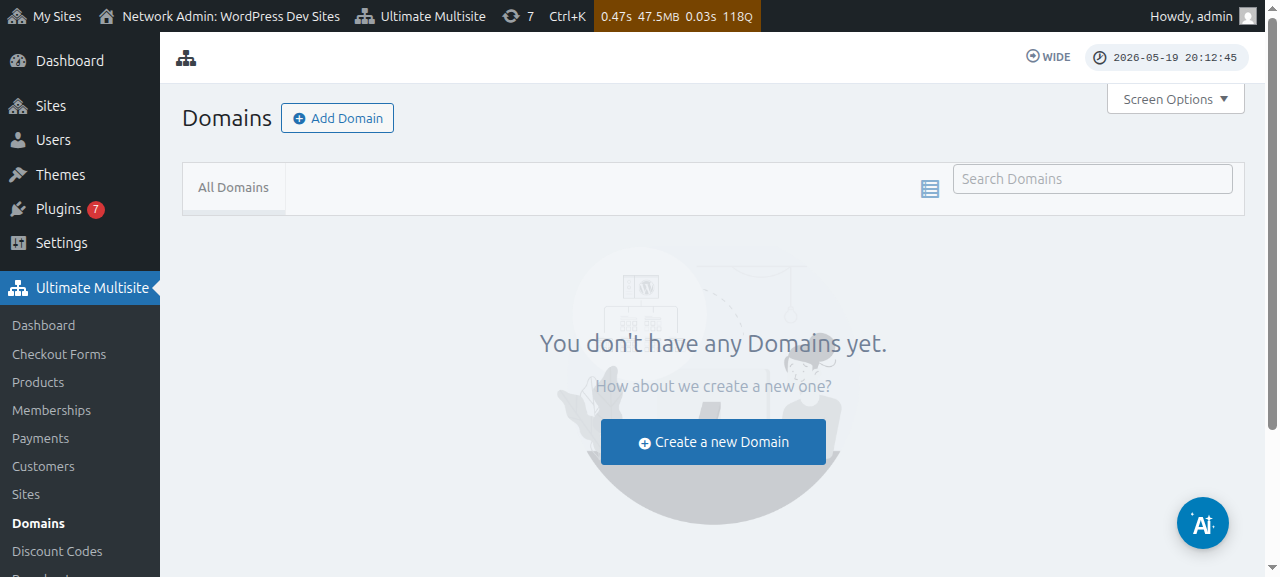
Hauv nplooj no, koj tuaj yeem click lub button Ntxiv Domain saum toj thiab qhov no yuav qhib ib lub qhov rais modal uas koj tuaj yeem teeb thiab sau custom domain name , subsite uas koj xav apply custom domain name rau, thiab txiav txim seb koj puas xav teeb nws ua primary domain name los tsis ua (nco ntsoov tias koj tuaj yeem map ntau lub domain name rau ib lub subsite).
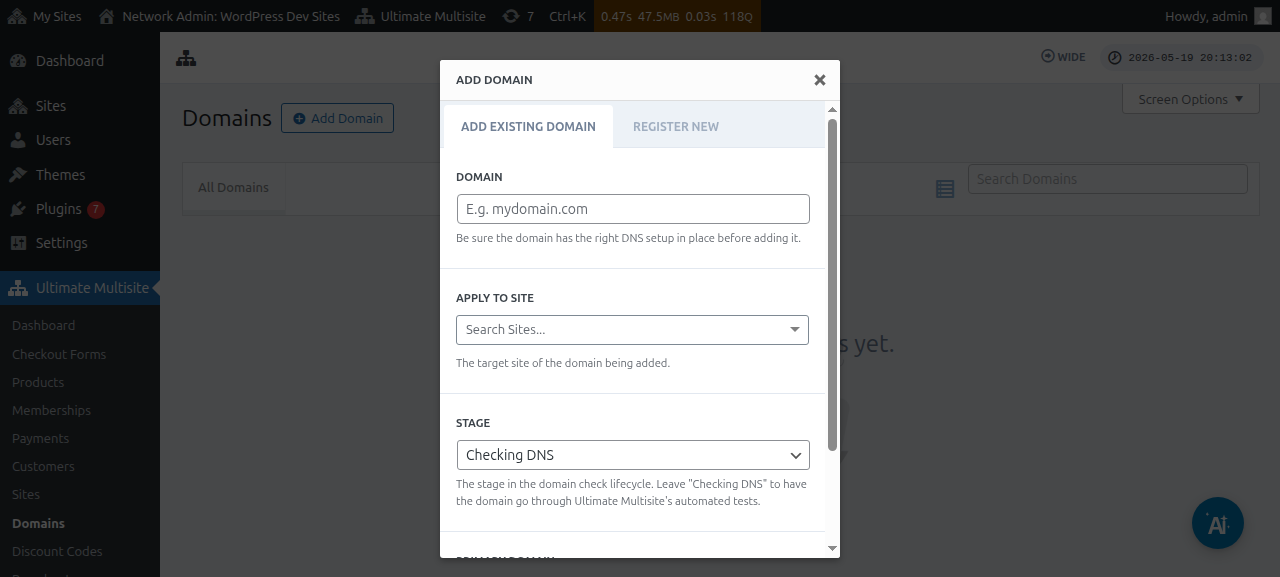
Tom qab sau tag nrho cov ntaub ntawv lawm, ces koj tuaj yeem click lub button Ntxiv Existing Domain nyob hauv qab.
Qhov no yuav pib txheej txheem verify thiab fetch cov DNS information ntawm custom domain. Koj kuj yuav pom ib daim log nyob hauv qab nplooj ntawv kom koj taug qab tau txoj kev ua haujlwm uas nws tab tom mus dhau. Txheej txheem no tej zaum yuav siv ob peb feeb kom tiav.
Ultimate Multisite v2.13.0 kuj tsim cov ntaub ntawv domain sab hauv cia li thaum ib lub site tshiab raug tsim rau saum ib tug host uas yuav tsum raug suav tias yog domain rau ib-site. Yog tus host yog network lub domain tseem ceeb, los yog yog ib qho ntawm cov shared checkout-form base domains uas tau teeb rau ntawm daim teb Site URL, ces cov ntaub ntawv mapped-domain uas tsim cia li yuav raug hla kom shared base domain ntawd tseem siv tau rau txhua lub site uas siv nws.
Thaum ib tus neeg siv khoom sau npe ib lub domain tshiab los ntawm Domain Seller v1.3.0 lossis tshiab dua, Ultimate Multisite yuav cia li map lub domain uas tau sau npe rau tus neeg siv khoom lub network site raws li default. Cov thawj tswj tsis tas yuav ntxiv ib daim ntaub ntawv mapped-domain cais tom qab kev sau npe tiav lawm, tshwj tsis yog lawv xav kho cov kev xaiv xws li primary-domain flag, activation state, lossis SSL handling.
Qhov Stage lossis status yuav tsum hloov ntawm Checking DNS mus rau Ready yog tias txhua yam raug teeb kom yog lawm.
Yog koj nyem rau ntawm lub npe domain, koj yuav pom qee qhov kev xaiv nyob hauv nws. Cia peb saib sai sai txog lawv:
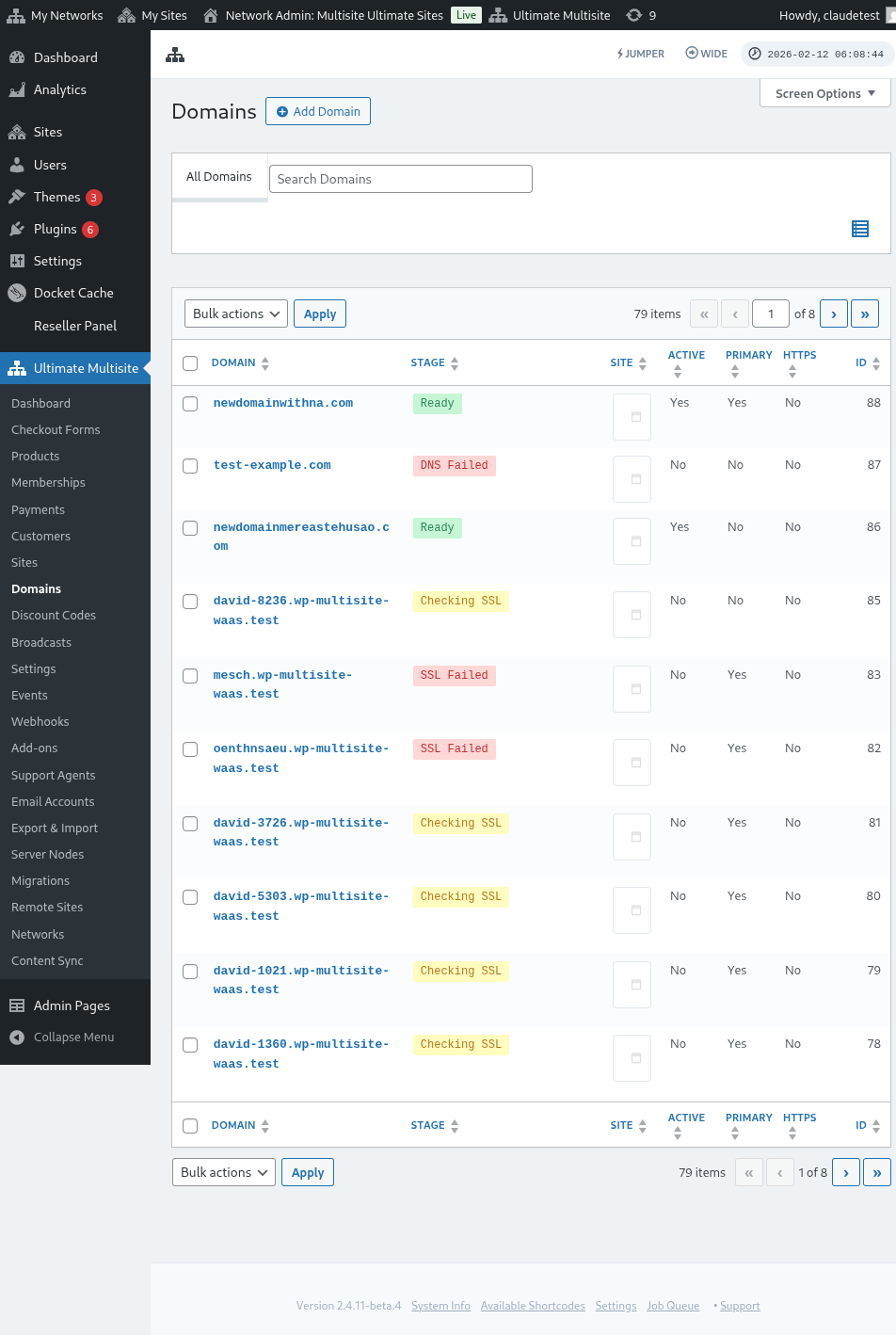
Stage: Qhov no yog stage uas lub domain tab tom nyob. Thaum koj thawj zaug ntxiv lub domain, tej zaum nws yuav nyob ntawm stage Checking DNS. Tus txheej txheem yuav kuaj cov DNS entries thiab paub meej tias lawv raug lawm. Tom qab ntawd, lub domain yuav raug muab tso rau stage Checking SSL. Ultimate Multisite yuav kuaj seb lub domain puas muaj SSL lossis tsis muaj thiab yuav faib koj lub domain ua Ready lossis Ready (without SSL).
Site: Lub subdomain uas txuas nrog lub domain no. Lub mapped domain yuav qhia cov ntsiab lus ntawm lub site tshwj xeeb no.
Active: Koj qhib lossis tua tau qhov kev xaiv no kom activate lossis deactivate lub domain.
Is Primary Domain?: Koj cov neeg siv khoom muaj tau ntau tshaj ib lub mapped domain rau txhua lub site. Siv qhov kev xaiv no los xaiv seb qhov no puas yog primary domain rau lub site tshwj xeeb ntawd.
Is Secure?: Txawm tias Ultimate Multisite kuaj seb lub domain puas muaj SSL certificate lossis tsis muaj ua ntej qhib nws, koj tseem manually xaiv tau kom load lub domain nrog lossis tsis nrog SSL certificate. Nco ntsoov tias yog lub website tsis muaj SSL certificate thiab koj sim yuam kom load nws nrog SSL, tej zaum nws yuav qhia error rau koj.
Mapping lub npe custom domain ua Subsite user
Cov thawj tswj subsite kuj map tau cov npe custom domain ntawm lawv lub subsite admin dashboard thiab.
Ua ntej, koj yuav tsum xyuas kom meej tias koj enable qhov kev xaiv no hauv cov settings Domain mapping. Saib daim duab hauv qab no.
Koj kuj teeb lossis configure tau qhov kev xaiv no nyob rau qib Plan lossis cov product options ntawm Ultimate Multisite > Products.
Thaum ib qho ntawm cov kev xaiv ntawd raug enable thiab ib tug subsite user raug tso cai map cov npe custom domain, tus subsite user yuav tsum pom ib lub metabox hauv qab nplooj ntawv Account hu ua Domains.
Tus user nyem tau lub khawm Add Domain thiab nws yuav qhib ib lub qhov rais modal nrog qee cov lus qhia.
Tom qab ntawd tus user nyem tau Next Step thiab txuas ntxiv mus ntxiv lub npe custom domain. Lawv kuj xaiv tau seb qhov no puas yuav yog primary domain lossis tsis yog.
Nyem Add Domain yuav pib tus txheej txheem los verify thiab fetch cov ntaub ntawv DNS ntawm lub custom domain.
Hais txog Domain Syncing
Domain Syncing yog ib tug txheej txheem uas Ultimate Multisite ntxiv lub npe custom domain rau koj tus hosting account ua add-on domain kom domain mapping ua haujlwm tau.
Domain syncing tshwm sim cia li yog koj tus hosting provider muaj integration nrog Ultimate Multisite qhov feature domain mapping. Tam sim no, cov hosting providers no yog Runcloud, Closte, WP Engine, Gridpane, WPMU Dev, Cloudways, thiab Cpanel.
Thaum host-provider integration ua haujlwm lawm, Ultimate Multisite kuj enqueue tau txoj haujlwm provider-side DNS lossis subdomain creation rau cov site tshiab uas nyuam qhuav tsim. Yog tsis muaj integration mloog txoj haujlwm ntawd, background job yuav raug hla kom tsis txhob muaj queue entries uas tsis ua dab tsi. DNS thiab SSL checks rau mapped domains tseem khiav mus raws tus txheej txheem domain-stage li qub.
Koj yuav tsum activate qhov integration no hauv Ultimate Multisite settings hauv qab tab Integration.
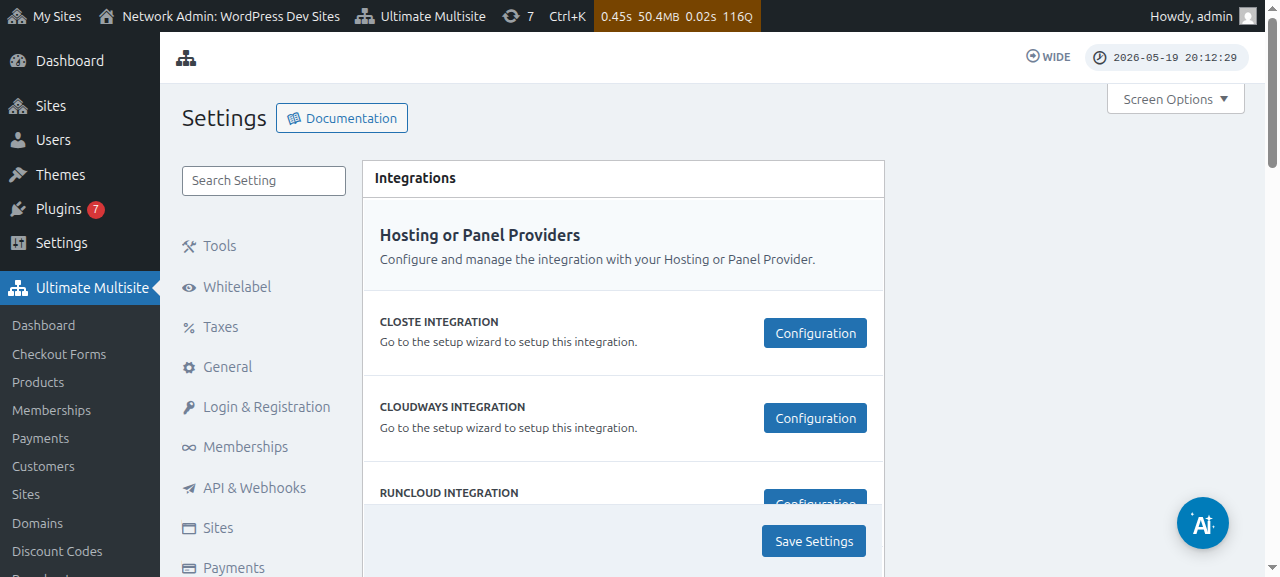
Nco ntsoov tias yog koj tus hosting provider tsis yog ib qho ntawm cov providers uas tau hais saum toj no,koj yuav tsum manually sync lossis ntxiv lub npe domain rau koj tus hosting account.