WooCommerce Kev koom ua ke
WooCommerce Kev koom ua ke ua haujlwm zoo ib yam li peb txoj kev them nyiaj ua tes. Nws muab kev yoog raws ntau heev rau koj cov neeg siv, tso cai rau lawv xaiv ib daim ntawv them nyiaj twg los tau uas muaj nyob hauv koj qhov WooCommerce uas nruab lawm. Thiab nws yooj yim: thaum tus neeg siv lub sijhawm them nqi xaus, tus neeg siv qhov kev tso npe yuav raug muab tso tseg ib ntus. Tib lub sijhawm, ib qho xaj yuav raug tsim rau ntawm WooCommerce uas nruab rau hauv lub site tseem ceeb ntawm lub network. Tom qab ntawd tus neeg siv yuav tau txais ib daim invoice hauv lawv tus email, nrog ib qhov link mus ua kev them nyiaj. Thaum tau txais kev them nyiaj lawm, qhov kev tso npe yuav raug txuas ntxiv.
Cov yam ntxwv
- Kev koom ua ke yooj yim ntawm Ultimate Multisite thiab WooCommerce
- Muaj ntau txoj kev them nyiaj
- Kev them nqi rov qab tsis siv tes siv lub subscriptions core uas muab nrog, nrog kev txhim kho ntxiv tau los ntawm WooCommerce Subscriptions qhov txuas ntxiv
- Cov nyiaj tag nrho thaum them nyiaj suav Ultimate Multisite cov se ua cov WooCommerce fee lines cais, tsis raug se, kom cov neeg yuav khoom saib tau cov nyiaj se ua ntej them nyiaj
Ntaub ntawv qhia
Teeb WooCommerce Kev koom ua ke
Nthuav koj cov Kev Xaiv Them Nyiaj nrog Ultimate Multisite: WooCommerce Kev koom ua ke
Kev nruab
- Upload 'ultimate-multisite-woocommerce' mus rau lub directory '/wp-content/plugins/'
- Qhib qhov txuas ntxiv ntawm lub 'Plugins' menu hauv WordPress
- Ua raws tus Wizard ib kauj ruam zuj zus los teeb qhov txuas ntxiv
Phau ntawv qhia siv
LUS TSEEM CEEB: Kab lus no hais txog Ultimate Multisite version 2.x.
CEEB TOOM: Ultimate Multisite: WooCommerce Kev koom ua ke yuav tsum muaj WooCommerce qhib tsawg kawg ntawm koj lub site tseem ceeb.
Peb nkag siab tias Stripe thiab PayPal tsis muaj nyob rau qee lub teb chaws, uas txwv los sis cuam tshuam cov neeg siv Ultimate Multisite kom siv tau peb qhov txuas ntxiv zoo. Yog li peb tau tsim ib qhov txuas ntxiv los koom ua ke nrog WooCommerce.
WooCommerce yog ib qho eCommerce txuas ntxiv uas nrov heev. Cov developers thoob ntiaj teb tau tsim cov txuas ntxiv los koom ua ke ntau hom payment gateways rau nws. Peb siv qhov no los nthuav cov payment gateways uas koj siv tau hauv Ultimate Multisite billing system.
Teeb Nws
Ua ntej, koj yuav tsum nruab WooCommerce Kev koom ua ke qhov txuas ntxiv uas yog pub dawb rau cov neeg siv muaj license. Los nruab nws, nyem rau Ultimate Multisite ntawm koj lub super admin dashboard thiab xaiv Add-ons.
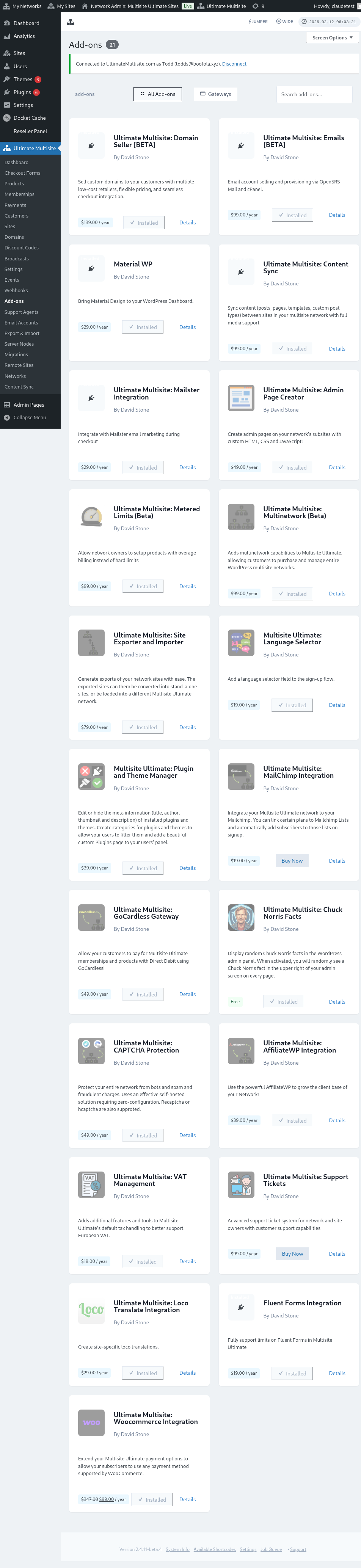
Ntawm no koj nrhiav tau tag nrho Ultimate Multisite cov add-ons. Nyem rau Ultimate Multisite: WooCommerce Kev koom ua ke add-on.
Ib lub qhov rais yuav tshwm nrog cov ntsiab lus ntawm add-on. Tsuas yog nyem rau Install Now .
Tom qab kev nruab tiav lawm, koj yuav raug xa mus rau nplooj plugins. Ntawm no, tsuas yog nyem rau Network Activate ces WooCommerce add-on yuav raug qhib rau ntawm koj lub network.
Tom qab qhib nws lawm, yog tias koj tseem tsis tau nruab thiab qhib WooCommerce qhov txuas ntxiv rau ntawm koj lub website, koj yuav tau txais ib qho kev ceeb toom.
Thaum nruab tiav lawm, koj yuav pom ib qho kev xaiv ntxiv nyob hauv Ultimate Multisite cov kev teeb payment. Tom qab ntawd koj tuaj yeem qhib qhov kev xaiv WooCommerce ntawm qhov ntawd.
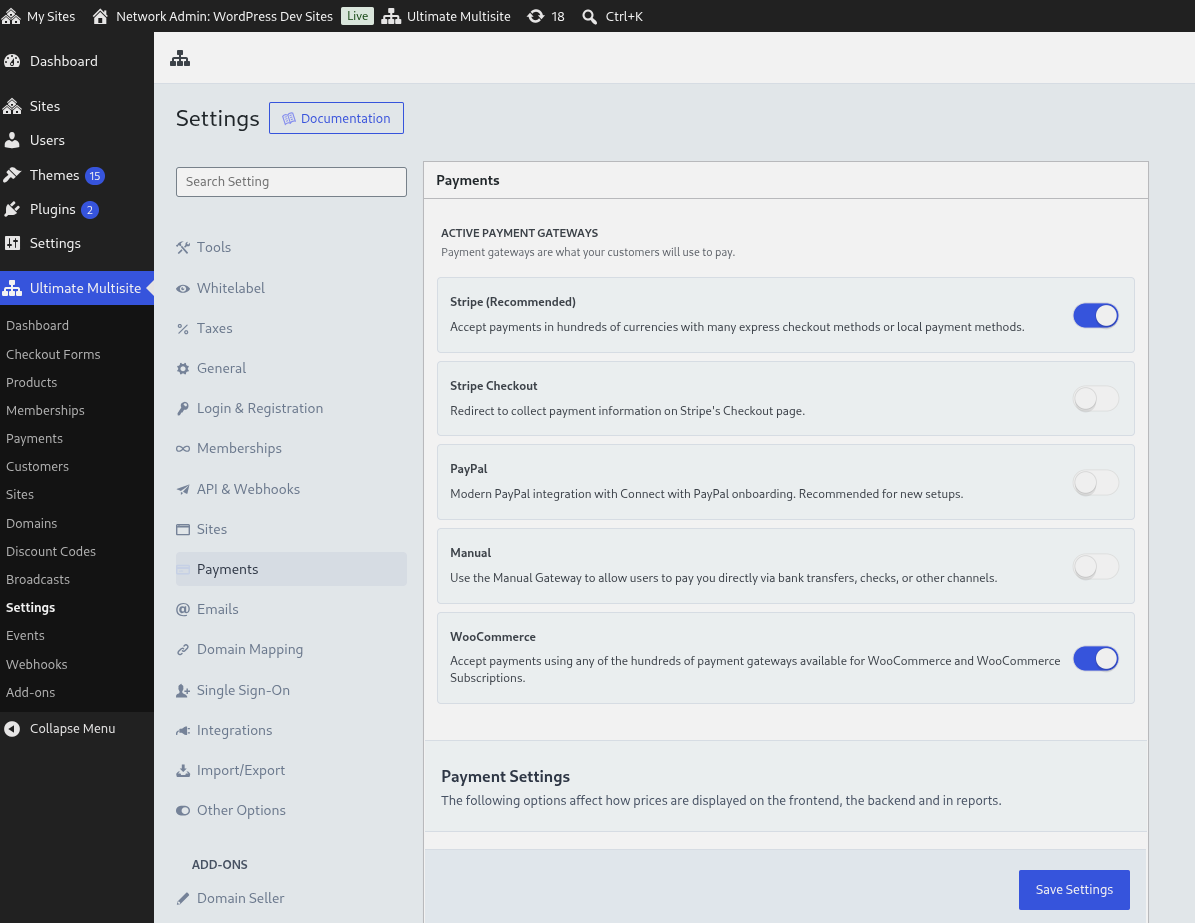
Koj tuaj yeem teeb qee yam yooj yim xws li lub npe tso saib uas yuav pom nyob rau sab front end thiab cov lus qhia los coj koj cov neeg siv hauv lawv txoj kev them nyiaj. Ces koj tuaj yeem mus rau koj Lub site tseem ceeb cov WooCommerce settings kom qhib thiab teeb payment gateway uas koj xav siv.
Cov kab fee se thaum them nyiaj
Thaum Ultimate Multisite checkout muaj se, qhov kev koom ua ke ntxiv txhua tus nqi se ntawm Ultimate Multisite rau hauv WooCommerce checkout ua ib kab fee cais uas tsis raug se. Qhov no ua kom cov se tag nrho pom ua ntej them nyiaj thiab tiv thaiv WooCommerce kom tsis txhob muab se rau tus tax fee ntawd dua.
Yuav tswj kev them nyiaj li cas
WooCommerce Kev koom ua ke ua haujlwm zoo ib yam li peb txoj kev them nyiaj ua tes. Qhov tsis zoo yog txhua qhov kev them nyiaj yuav tsum them ua tes thaum xaus lub sijhawm them nqi. Nov yog txoj kev ua haujlwm:
-
Thaum tus neeg siv lub billing cycle xaus, qhov membership raug muab tso tseg ib ntus. Tib lub sijhawm, ib qho xaj yuav raug tsim rau ntawm WooCommerce uas nruab rau ntawm koj lub network lub site tseem ceeb.
-
Tom qab ntawd cov neeg siv tau txais ib daim invoice hauv lawv tus email, nrog ib qhov link mus ua kev them nyiaj (qhov link kuj tshwm hauv lawv billing history ntawm lawv subsite dashboard). Qhov link ntawd xa tus neeg siv mus rau WooCommerce checkout , qhov chaw uas cov neeg siv yuav xaiv tau ib qho ntawm cov WooCommerce gateways uas muaj kom ua lawv qhov kev them nyiaj.
-
Thaum tau txais kev them nyiaj lawm, qhov membership raug txuas ntxiv , kev them nyiaj raug sau tseg rau hauv Ultimate Multisite thiab qhov xaj raug teeb kom tiav.
Qee cov Lus Ceeb Toom Tseem Ceeb:
-
Qhov functionality qub ntawm Ultimate Multisite tseem ua haujlwm nrog hom kev koom ua ke no. Piv txwv li, muab refunds ntawm lub vijtsam Subscription Management yuav sib txuas lus nrog WooCommerce kom muab refund siv daim ntawv them nyiaj uas tau xaiv.
-
Ultimate Multisite: WooCommerce Kev koom ua ke vam khom WP-Cron kom ua haujlwm. Qhov no ua haujlwm zoo heev feem ntau, tab sis yog tias lub site muaj traffic tsawg ces cron yuav tsis raug hu kom xyuas cov xwm txheej teem tseg thiab qhov xwm txheej yuav ploj, uas tuaj yeem ua rau kev khiav haujlwm qeeb.
WooCommerce Subscriptions Qhov txuas ntxiv
Kev pib kev them nyiaj manually txhua hli tsis yog qhov zoo rau cov end-users, vim subscriptions yuav tsum rov tshwm sim cia li txhua billing cycle. Lub WooCommerce Integration add-on tam sim no twb muab cov core subscriptions code los nrog lawm, yog li recurring products ib txwm siv subscriptions rau recurring billing.
Koj tsis tas yuav yuav lossis nruab qhov WooCommerce Subscriptions plugin uas cais tawm los muag recurring products dhau ntawm qhov integration no. Yog tias plugin ntawd raug yuav, raug nruab, thiab muaj nyob rau koj lub site tseem ceeb, Ultimate Multisite yuav siv nws thiab WooCommerce yuav nthuav qhia cov subscription management features ntxiv. Thaum nws tsis muaj, cov subscriptions core uas muab los nrog tseem yuav tswj recurring products.
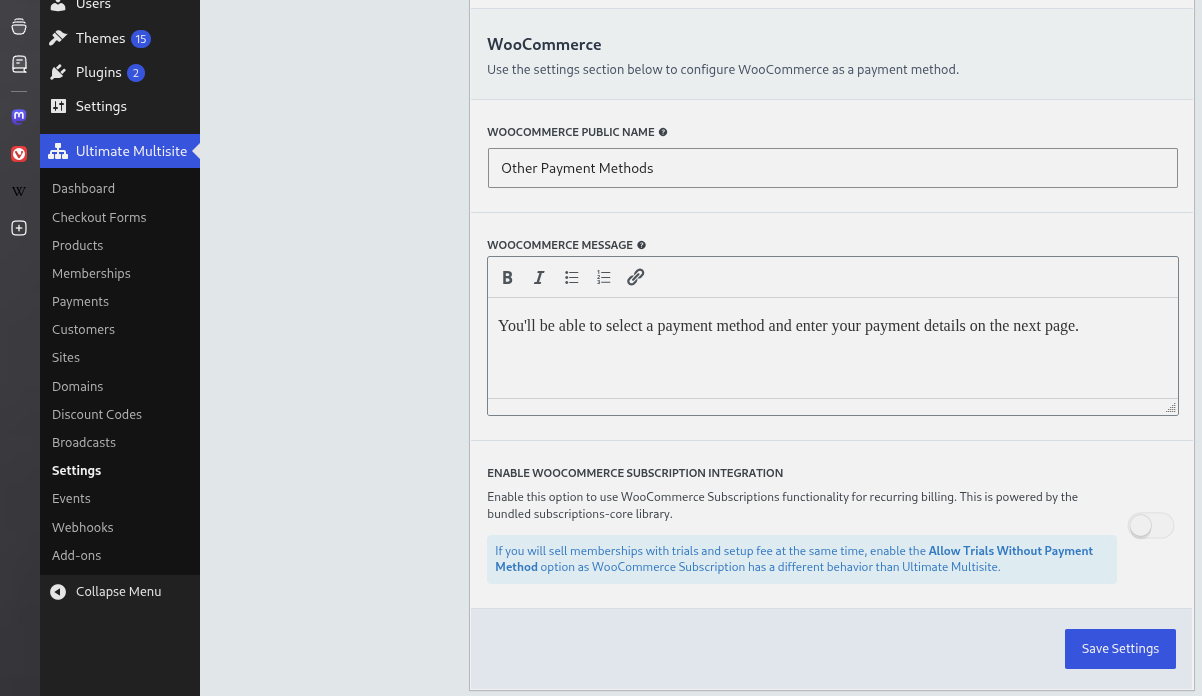
Thiab tsuas yog li ntawd xwb. Koj cov end-users yuav tsis tas manually them nyiaj ntxiv thaum kawg ntawm lawv billing cycle rau recurring products lawm.
Dhau li ntawm ib qho order raug tsim rau ntawm koj lub site tseem ceeb hauv WooCommerce, nws tseem yuav tsim ib qho subscription rau txhua account.
Tus cwj pwm ncua tseg thaum renewal poob
Raws li default, memberships tseem active thaum WooCommerce Subscriptions tab tom khiav nws failed-payment retry schedule. Qhov no khaws lub grace window ib txwm ntawm WooCommerce Subscriptions kom ib qho renewal uas rov qab tau thiaj coj tau subscription thiab membership rov sync yam tsis txhob txiav access ntxov dhau.
Cov administrators uas xav kom access control nruj dua tuaj yeem qhib Suspend Memberships Immediately on Failed Renewals hauv WooCommerce Integration settings. Thaum qhov opt-in setting no raug qhib, Ultimate Multisite yuav suspend membership uas cuam tshuam tam sim ntawd thaum renewal payment poob es tsis tos kom WooCommerce Subscriptions retry handling ua tiav.
Developers tuaj yeem override tib qho kev txiav txim ntawd nrog wu_woo_suspend_on_payment_failure filter. Cov hook reference pages yog generated los ntawm add-on source, yog li qhov overview no tsuas hais txog lub npe filter rau custom suspension policies.