Code Snippets for v2
Basically, code snippets for WordPress are used to do certain actions that might otherwise require a dedicated smaller plugin. Such code snippets are placed in one of the WordPress core or theme files (generally the functions.php file of your theme) or they can be used as a MU plugin.
In this article we will show you three code snippets that can be used with Ultimate Multisite v2 :
Changing the position of the Account menu item
To change the position of the Account menu item on your client's Dashboard, just add the following code snippet to the functions.php of your main site's active theme. You can also put the snippet inside one of you mu-plugins or custom plugins.
add_filter('wu_my_account_menu_position', function() { return 10; // Tweak this value to place the menu in the desired position.
How to check if the user is under a given plan and/or has an active subscription
As a network admin, you may need to create custom functions that will perform basic actions or make a service/feature available to a selected group of subscribers or end-users, based on the status of their subscription and the plan they are subscribed under.
These Ultimate Multisite native functions will help you with that.
To check if the user is a member of a given plan, you can use the function:
wu_has_plan($user_id, $plan_id)
כדי kiểm tra xem מנוי פעיל או לא, אתה יכול להשתמש בפונקציה:
wu_is_active_subscriber($user_id)
להלן דוגמה קטנה שבודקת אם המשתמש הנוכחי נמצא תחת תוכנית ספציפית (Plan ID 50) וגם אם מנוי המשתמש פעיל.
$user_id = get_current_user_id(); $plan_id = 50; if (wu_has_plan($user_id, $plan_id) && wu_is_active_subscriber($user_id)) { // המשתמש חבר בתוכנית ומנוי שלו פעיל, עשה את הדברים האלה } else { // המשתמש לא חבר בתוכנית -- או -- מנוי שלו לא פעיל, עשה את הדברים האלה } // סוף if;
שימו לב שפונקציית _**wu_has_plan**_ דורשת "Plan ID" כדי שתעבוד.
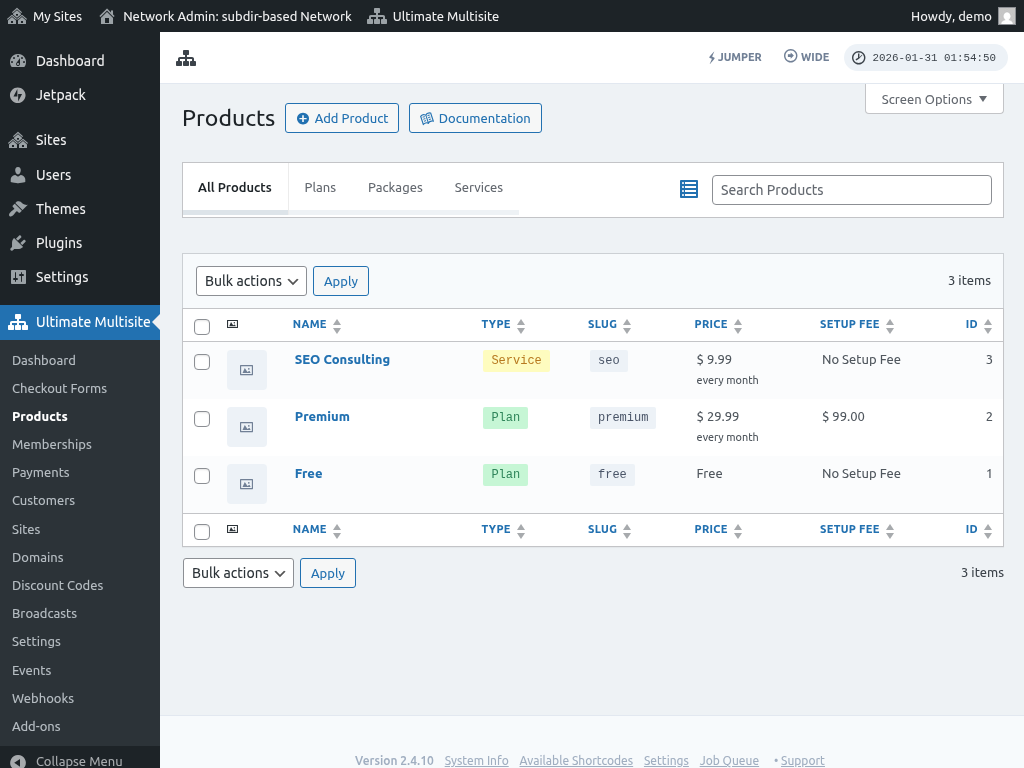
כדי לקבל את ה-ID של תוכנית, תוכל להיכנס ל Ultimate Multisite > Products. ה-ID של כל מוצר יופיע בצד ימין של הטבלה.
שימו לב שמשתמשים יכולים להירשם רק בתוכנית (Plan), ולא בחבילה או שירות, כי אלו רק תוספים לתוכנית.
תיקון בעיות CORS עם Font-Icons בדומיינים ממופים
תיקון בעיות CORS עם Font-Icons בדומיינים ממופים
אחרי שאתה ממפה דומיין לאתר משנה, ייתכן שתגלה שהאתר מתקשה לטעון פונטים מותאמים אישית. זה נובע מחסימה חוצת-מקור (cross-origin block) בהגדרות השרת שלך.
מכיוון שקבצי הפונט נטענים כמעט תמיד ישירות מתוך קובץ CSS, התוסף למפת דומיינים שלנו לא יכול לשנות את כתובות ה-URL כדי להשתמש בדומיין הממופה במקום בכתובת המקורית. לכן, כדי לתקן את הבעיה, תצטרך לערוך את קבצי הגדרות השרת שלך.
Apache
Thov hauv .htaccess file, thov zo:
<FilesMatch “.(ttf|ttc|otf|eot|woff|font.css|css)$”> Header set Access-Control-Allow-Origin “*”
NGINX
Hauv server config file (location thav tsis them rau server rau server), thov zo:
location ~ .(ttf|ttc|otf|eot|woff|font.css|css)$ { add_header Access-Control-Allow-Origin “*”;}