Ultimate Multisite 101
Ultimate Multisite એ WordPress Multisite plugin છે જે તમને ગ્રાહકોને WaaS અથવા Websites as a Service ઓફર કરવાની ક્ષમતા આપે છે. આપણે Ultimate Multisite તમારા વ્યવસાય અને ગ્રાહકોને કેવી રીતે મદદ કરી શકે છે તે શીખવા પહેલાં, કેટલાક પાયાના જ્ઞાનની જરૂર છે.
The WordPress Multisite
આપણામાંથી મોટાભાગના લોકો સ્ટાન્ડર્ડ WordPress installation થી પરિચિત છે. તમે કાં તો તમારા hosting provider ના control panel દ્વારા તેને બનાવો છો અથવા, હિંમતવાળા લોકો માટે, નવો web server અને database સેટઅપ કરો, core files ડાઉનલોડ કરો અને installation પ્રક્રિયા શરૂ કરો.
આ દુનિયાભરની લાખો WordPress sites માટે કામ કરે છે પરંતુ agency અથવા hosting provider ના દૃષ્ટિકોણથી ચાલો થોડીવાર volume વિશે વાત કરીએ.
જ્યારે એક WordPress site બનાવવી અથવા automated control panel દ્વારા સો sites બનાવવી સરળ છે, આ sites ના management ની વાત આવે ત્યારે સમસ્યાઓ જલ્દી દેખાવા લાગે છે. જો management ન થાય તો તમે malware માટે સરળ લક્ષ્ય બની જાઓ છો. Management કરવા માટે મહેનત અને resources ની જરૂર પડે છે અને જોકે WordPress sites ના management અને administration ને સરળ બનાવવા માટે external tools અને plugins ઉપલબ્ધ છે, ગ્રાહકો પાસે administrative access હોવાથી આ બધી મહેનત નિષ્ફળ થઈ શકે છે.
WordPress તેના core માં 'Multisite' નામની feature પ્રદાન કરે છે જેની શરૂઆત 2010 માં WordPress 3.0 ના launch સાથે થઈ હતી. ત્યારથી નવી features રજૂ કરવા અને security મજબૂત કરવા માટે ઘણા revisions આવ્યા છે.
સરળ શબ્દોમાં, WordPress multisite ને આ રીતે સમજી શકાય: એક University WordPress ની single installation રાખે છે પરંતુ દરેક faculty પોતાની WordPress site maintain કરે છે.
આ statement ને સમજવા માટે ચાલો કેટલી મૂળભૂત terminology જોઈએ જે Ultimate Multisite ના documentation માં અને WordPress community માં વપરાય છે.
The Network
WordPress ની દ્રષ્ટિએ, multisite network એ છે જ્યાં એક જ dashboard માંથી ઘણી subsites manage કરી શકાય છે. Multisite network બનાવવું hosting providers વચ્ચે અલગ હોય છે, પરંતુ અંતિમ પરિણામ સામાન્ય રીતે wp-config.php file માં થોડા વધારાના directives હોય છે જે WordPress ને જણાવે છે કે તે આ ચોક્કસ mode માં ચાલી રહ્યું છે.
Multisite network અને stand-alone WordPress installation વચ્ચે ઘણા અલગ તફાવતો છે જેની આપણે ટૂંકમાં ચર્ચા કરીશું.
Subdomain vs. Subdirectory
તમારે જે સૌથી પહેલો નિર્ણય લેવો પડશે તે છે કે multisite installation subdirectories સાથે ચાલશે કે subdomains સાથે. Ultimate Multisite બંને choices સાથે સરખી રીતે કામ કરે છે પરંતુ બે configurations વચ્ચે કેટલાક architectural તફાવતો છે.
subdirectory configuration માં, network sites main domain name પર આધારિત path મેળવે છે. ઉદાહરણ તરીકે 'site1' નામની network site નું full URL https://domain.com/site1 હશે. subdomain configuration માં, network site ને main domain name માંથી derived પોતાનું subdomain મળે છે. આથી 'site1' નામની site નું full URL https://site1.domain.com/ હશે.
જ્યારે બંને options સંપૂર્ણ માન્ય choices છે, subdomains નો ઉપયોગ ઘણા ફાયદાઓ આપે છે પરંતુ તેના architecture માં વધુ વિચાર અને planning ની જરૂર પડે છે.
DNS ની દ્રષ્ટિએ subdirectories નો ઉપયોગ પ્રમાણમાં સરળ challenge છે. કારણ કે network sites parent path ના children છે, ફક્ત main domain name માટે એક domain name entry ની જરૂર છે. subdomains માટે challenge થોડો વધુ complex છે જેમાં દરેક network site માટે અલગ CNAME entry અથવા DNS records માં wildcard (*) entry ની જરૂર પડે છે.
વધુ એક વિચારણા SSL ની છે અને SSL certificates ની issuance અને ઉપયોગની. subdirectory configuration માં એક single domain certificate વાપરી શકાય છે કારણ કે network sites main domain name ના paths છે. આથી domain.com માટેનું certificate https://domain.com/site1, https://domain.com/site2 અને આગળની sites માટે યોગ્ય રીતે SSL પ્રદાન કરશે.
subdomain configuration માં wildcard SSL certificate એ સૌથી સામાન્ય options માંનું એક છે. આ પ્રકારનું SSL certificate domain અને તેના subdomains માટે encryption પ્રદાન કરે છે. તેથી wildcard SSL certificate https://site1.domain.com, https://site2.domain.com અને https://domain.com પોતે માટે encryption પ્રદાન કરશે.
જોકે અન્ય options પણ છે, તે ઘણીવાર scope અને application માં મર્યાદિત હોય છે અને suitability માટે વધારાના configuration અને વિચારણાની જરૂર પડે છે.
Plugins અને Themes
WordPress જે આપે છે તે પાછું પણ લે છે, ઓછામાં ઓછું ગ્રાહકના દૃષ્ટિકોણથી. Stand-alone WordPress installation માં જો site administrator ખરાબ plugin install કરે અથવા તેમની installation up to date ન રાખે તો એકમાત્ર ભોગ બનનાર તેઓ પોતે છે. જોકે, multisite installation પર site administrator ખરાબ plugin install કરે તો network માં installed દરેક site ભોગ બને છે.
આ કારણસર multisite તરીકે configure થયા પછી WordPress site administrators પાસેથી plugins અને themes install કરવાની capability કાઢી નાખે છે અને તેના બદલે આ capability નવા બનાવેલા network administrator અથવા 'super admin' role ને આપે છે. આ privileged role પછી નક્કી કરી શકે છે કે network sites ના administrators ને તેમના dashboard માં plugins menu જોવા અથવા access કરવા દેવું કે નહીં અને, જો હા, તો આ permissions plugins ને activating અથવા deactivating સુધી extend થાય કે નહીં.
આ રીતે network administrator plugins અને themes ને network માં install કરવા અને network sites ને આ plugins અને themes વાપરવાની permissions delegate કરવા માટે જવાબદાર છે. Site administrators plugins અને themes install કરી શકતા નથી અથવા તેમની site ને assign ન કરેલા plugins અને themes access કરી શકતા નથી.
Users અને Administrators
WordPress Multisite માં, બધી network sites એક જ database share કરે છે અને તેથી એ જ users, roles અને capabilities share કરે છે. તેને સમજવાનો સૌથી યોગ્ય રસ્તો એ છે કે બધા users network ના members છે અને કોઈ particular site ના નહીં.
આ સમજણ સાથે users create કરવાની મંજૂરી આપવી અનિચ્છનીય હોઈ શકે છે અને આ કારણસર WordPress Multisite site administrators પાસેથી આ capability કાઢી નાખે છે અને network administrator ને આપે છે. બદલામાં network administrator site administrator ને તેમની પોતાની site માટે user accounts બનાવવાની જરૂરી privileges delegate કરી શકે છે.
ઉપરનું statement ફરીથી કહેતાં, જોકે user accounts site સાથે સંબંધિત દેખાય છે તેઓ ખરેખર network ને allocated છે અને તેથી network માં unique હોવા જોઈએ. આ કારણસર કેટલાક usernames register કરવા માટે unavailable હોઈ શકે છે.
જોકે enterprise systems માં આ foreign concept નથી, user registration અને authentication નો આ single source stand-alone WordPress installations થી પરિચિત લોકો માટે ઘણીવાર સમજવામાં મુશ્કેલ concept છે જ્યાં user administration કંઈક વધુ સરળ છે.
Media
જ્યાં WordPress Multisite માં network sites single database share કરે છે, તેઓ media files માટે filesystem પર અલગ paths maintain કરે છે.
Standard WordPress location (wp-content/uploads) રહે છે; જોકે, તેનો path network site ના unique ID ને reflect કરવા માટે બદલાય છે. પરિણામે network site માટે media files wp-contents/uploads/site/[id] તરીકે દેખાય છે.
Permalinks
આપણે પહેલાં જણાવ્યું કે subdirectory configuration કરતાં subdomain ના distinctive advantages છે અને અહીં તે છે: paths.
subdirectory configuration માં, main site (network establish થાય ત્યારે બનાવેલી પ્રથમ site) અને network subsites ને domain name થી શરૂ થતા એક જ path share કરવો પડે છે. આમાં ઘણા conflicts ની possibility છે.
Posts માટે, network sites સાથે clashes અટકાવવા main site ને mandatory /blog/ path add થાય છે. આનો અર્થ છે કે 'Post name' જેવા pretty permalinks domain.name/blog/post-name/ તરીકે present થશે.
subdomain configuration માં આ action જરૂરી નથી કારણ કે દરેક network site complete domain separation નો ફાયદો મેળવે છે અને તેથી single path પર depend રહેવાની જરૂર નથી. તેઓ તેના બદલે પોતાના subdomain પર આધારિત પોતાના distinct paths maintain કરે છે.
Static Pages
subdirectory configuration માં naming conflicts ની possibility static pages સુધી extend થાય છે કારણ કે main site અને network sites એક જ path share કરે છે.
આને અટકાવવા, WordPress certain site names ને blacklist કરવાનો રસ્તો પ્રદાન કરે છે જેથી તેઓ first site ના names સાથે conflict ન થાય. સામાન્ય રીતે network administrator main site ના pages ના root paths enter કરશે.
subdomain configuration માં naming conflicts ની possibility subdomain દ્વારા mitigate થાય છે કારણ કે તે network site માટે unique છે અને main site સાથે કોઈ રીતે સંબંધિત નથી.
Registration
WordPress Multisite ના network settings માં ઘણા નવા user registration options ઉપલબ્ધ છે, જે નવા અને existing users ને sites create કરવાની મંજૂરી આપે છે.
Stand-alone WordPress installations ની વિરુદ્ધ, network sites user registrations allow કરવા અથવા તે registrations ને roles assign કરવાના familiar options maintain કરતી નથી.
જ્યારે user accounts create થાય છે ત્યારે તે accounts network level પર generate થાય છે. આથી કોઈ એક particular site ના હોવાના બદલે તેઓ network ના છે. આના કેટલાક distinctive advantages અને disadvantages છે.
ઉદાહરણ તરીકે, ધારો કે તમારું WordPress Multisite news અને information ના business માં હતું. તમે multisite establish કરશો અને પછી finance, technology, entertainment અને interest ના અન્ય areas માટે network sites create કરશો જ્યારે plugins અને themes પર overall control રાખશો. દરેક network site પછી custom post types અથવા regular post categories કરતાં તેમની network site ના look અને feel અને user experience પર ઘણો વધારે control ધરાવશે.
આ રીતે જ્યારે user log in કરે છે ત્યારે તેઓ network માં log in કરે છે અને આખરે દરેક network site માં પણ log in થઈ જાય છે જે seamless experience આપે છે. જો તમારી new site subscription based હોય તો આ ideal solution અને outcome હશે.
જોકે, જો multisite નો intended purpose disparate network sites offer કરવાનો હોય જેમનો એકબીજા સાથે કોઈ relationship નથી તો લગભગ હંમેશા user roles ને manipulate કરવા માટે external અથવા additional plugins ની જરૂર પડે છે.
Domain અને SSL
ચાલો એક WordPress Multisite installation વિશે વાત કરીએ જે આપણા ધ્યાનથી લગભગ બચી જાય છે - WordPress.com. આ અત્યાર સુધીનું WordPress multisite નું સૌથી વ્યાપક ઉદાહરણ છે અને purpose fulfill કરવા માટે તેને customize અને mould કરવાની extensive abilities demonstrate કરે છે.
આજના modern internet પર SSL નો ઉપયોગ લગભગ mandatory છે અને WordPress multisites ના network administrators ને ટૂંક સમયમાં આ challenges નો સામનો કરવો પડે છે.
subdomain configuration માં sites root domain name પર based create થાય છે. આથી 'site1' labelled site 'site1.domain.com' તરીકે create થશે. Wildcard SSL certificate નો ઉપયોગ કરીને, network administrator આ challenge ને successfully address કરી શકે છે અને network માટે SSL encryption abilities પ્રદાન કરી શકે છે.
WordPress Multisite માં domain mapping function છે જે network sites ને custom domain names અથવા network ના root domain થી different domain names સાથે associate કરવાની મંજૂરી આપે છે.
Network administrators માટે આ domain name configuration અને SSL certificates ની issuance અને maintenance બંનેમાં additional layer of complexity રજૂ કરે છે.
આ રીતે જ્યારે WordPress Multisite www.anotherdomain.com ને 'site1' સાથે map કરવાનો રસ્તો પ્રદાન કરે છે, network administrator ને DNS entries ને externally manage કરવા અને SSL certificates implement કરવાના challenge સાથે છોડી દેવામાં આવે છે.
Ultimate Multisite
Stand-alone WordPress installation અને Multisite installation વચ્ચેના તફાવતો સમજ્યા પછી, ચાલો જોઈએ કે Ultimate Multisite Websites as a Service પ્રદાન કરવા માટે ultimate arsenal કેવી રીતે છે.
Introduction
જ્યારે Website as a Service (WaaS) create કરવાની વાત આવે છે ત્યારે Ultimate Multisite તમારું Swiss Army knife છે. Wix.com, Squarespace, WordPress.com વિશે વિચારો અને પછી તમારી પોતાની service own કરવા વિશે વિચારો.
Inside માં Ultimate Multisite WordPress Multisite નો ઉપયોગ કરે છે પરંતુ એવી રીતે જે network administrators multisite installations સાથે જે અસંખ્ય challenges face કરે છે તેને solve કરે છે તેમજ capabilities ને enhance કરે છે જેથી વિવિધ use cases support થઈ શકે.
આગળના sections માં આપણે કેટલાક common use cases અને તે cases ને support કરવા માટે જરૂરી considerations જોઈશું.
Use Cases
Case 1: An Agency
સામાન્ય રીતે agency ની core skills websites ની design માં હોય છે જ્યારે hosting અથવા marketing જેવા aspects additional services તરીકે list થાય છે.
Agencies માટે Ultimate Multisite single platform પર multiple websites host અને manage કરવાની abilities માં incredible value proposition રજૂ કરે છે. એવી agencies માટે વધુ પણ કે જેઓ GeneratePress, Astra, OceanWP અથવા અન્ય જેવા particular themes પર તેમના designs standardize કરે છે, Ultimate Multisite ની દરેક new site માટે automatically આ themes activate કરવાની abilities leverage કરી શકે છે.
એ જ રીતે common અને popular plugins માટે agency pricing ના deals ની abundance સાથે, Ultimate Multisite નો ઉપયોગ agencies ને existing investments leverage કરવાની મંજૂરી આપે છે common platform પ્રદાન કરીને જ્યાંથી plugins install, maintain અને use કરી શકાય.
મોટેભાગે configuration નો ઉપયોગ desired હશે અને fortunately Ultimate Multisite ઘણા popular hosting providers તેમજ Cloudflare અને cPanel જેવી services સાથેના integrations સાથે domain mapping અને SSL certificates facilitate કરવાનું incredibly easy બનાવે છે.
આથી આ providers માંથી એકનો leverage કરીને અથવા Ultimate Multisite ને Cloudflare પાછળ મૂકીને domains અને SSL certificates ના management જેવા aspects somewhat trivial બની જાય છે.
જે agencies sites ની creation પર tight control રાખવાનું prefer કરે છે તેઓ Ultimate Multisite ના streamlined interface દ્વારા sites create કરવાની અને sites ને customers અને plans સાથે associate કરવાની ease appreciate કરશે.
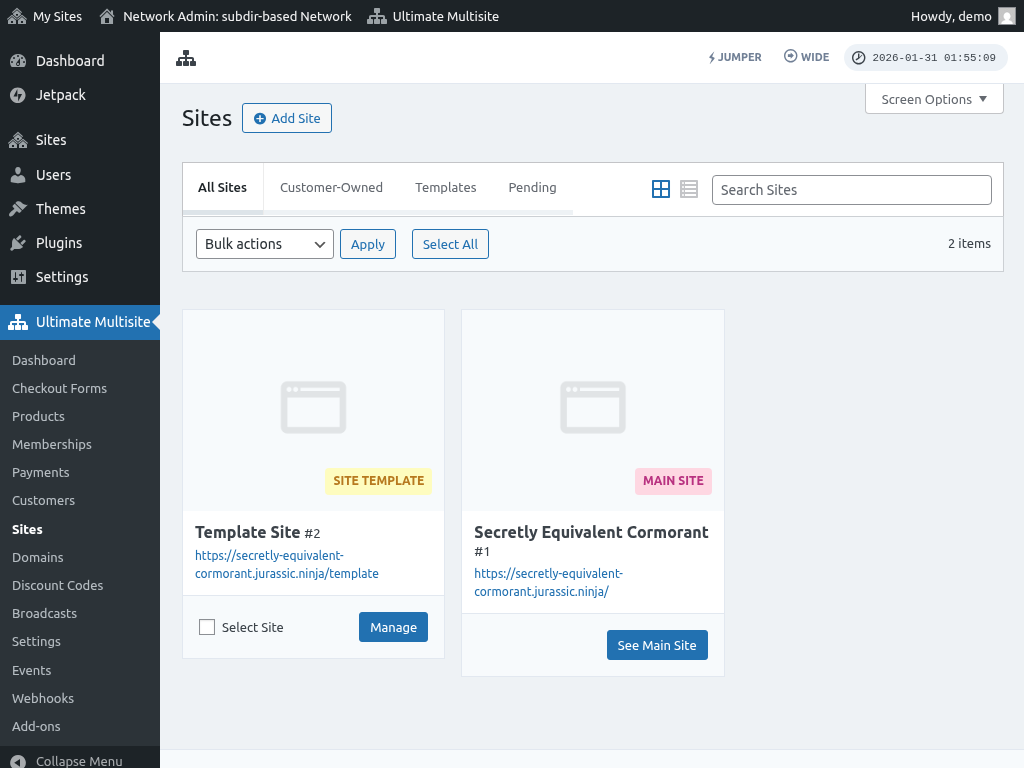
Plugins અને themes પર tight control Ultimate Multisite ના intuitive interfaces દ્વારા per-product basis પર maintain થાય છે જે plugins અને themes ને available અથવા hidden બનાવવાની તેમજ new site માટે instantiate થાય ત્યારે તેમની activation state ની મંજૂરી આપે છે.

Themes similar functionality provide કરે છે, particular themes ને site creation પર activate અથવા hide કરવાની મંજૂરી આપે છે.

Agencies ને Ultimate Multisite સાથે peace of mind મળશે જે તેમને શ્રેષ્ઠ કામ કરવા દે છે - exceptional web sites design કરવી.
Case 2: Niche Provider
એક જૂની કહેવત છે જે કહે છે, "એક કામ કરો અને તે સારું કરો". ઘણા specialists માટે આનો અર્થ single core idea ની આસપાસ product અથવા service create કરવી.
કદાચ તમે avid golfer છો clubs ને websites promote કરતા અથવા તમે avid esports gamer છો clans ને websites provide કરતા. Restaurants ને booking service promote કરનાર individual?
ઘણા કારણોસર તમે common framework અને platform પર based services provide કરવા માંગશો. તે એટલા માટે હોઈ શકે કે તમે required functionality provide કરવા માટે bespoke plugins design કર્યા છે અથવા invest કર્યું છે અથવા industry best practices design માટે કોઈ form of standardized approach require કરે.
Ultimate Multisite ની innovative features માંની એક template sites નો ઉપયોગ છે. Template site એ છે જ્યાં theme install અને activate થયું છે, necessary plugins install અને activate થયા છે અને sample posts અથવા pages create થયા છે. જ્યારે customer template પર based new site create કરે છે, template ના contents અને settings newly created site માં copy થાય છે.
Niche sites અને services ના provider માટે આ custom plugins અને design સાથે instantly site ready to go create કરવાની ability માં unparalleled advantage provide કરે છે. Customer ને service complete કરવા માટે ફક્ત minimal input provide કરવાની જરૂર છે.
Requirements પર depend કરીને subdirectory અથવા subdomain configurations બંને suit કરી શકે, જેમાં architecture choices subdirectories માટે simple SSL certificate અથવા subdomains માટે wildcard SSL certificate વચ્ચે હશે.
Case 3: WordPress Web Hosting
WordPress sites host કરવાની અસંખ્ય રીતો છે પરંતુ ભાગ્યે જ તે customer ને pre-installed version of WordPress સાથે web space provide કરવા જેટલું simple છે. આ એટલા માટે છે કારણ કે meaningful service provide કરવા માટે ઘણા decisions અને considerations ને એકસાથે આવવાની જરૂર છે.
Ultimate Multisite આ area માં excel કરે છે WordPress sites ના hosting માટે comprehensive turnkey solution provide કરીને. Solution માં subscription services, payment collection, checkout forms, discount vouchers અને customer communications provide કરવા માટેના core mechanisms included છે.
WordPress Multisite ને correctly install, configure અને maintain કરવા માટે જરૂરી ઘણું integral work Ultimate Multisite દ્વારા facilitate થાય છે એ હદે કે network administrators ને ફક્ત product tiers, pricing અને service offers જેવા aspects consider કરવાની જરૂર છે જે તેમની service અથવા niche સાથે related છે.
Ultimate Multisite સાથે integrate કરવા ઈચ્છતા developers માટે, solution comprehensive RESTful API અને event notification માટે Webhooks પણ offer કરે છે.
અસંખ્ય external plugins અને licenses પર reliance વિના, Ultimate Multisite Wix, Squarespace, WordPress.com અને અન્ય જેવું feature rich અને comparable solution provide કરે છે.
Architecture Considerations
જ્યારે comprehensive guide નથી, નીચેની items Ultimate Multisite installation ને support કરવા માટે technologies ની correct selection માટે guidance તરીકે serve કરવી જોઈએ.
Shared vs. Dedicated Hosting
કમનસીબે બધા hosting providers equal નથી અને કેટલાક extreme server densities practice કરે છે. Low-cost providers સામાન્ય રીતે server density maximize કરીને revenue generate કરે છે. આથી તમારી Ultimate Multisite installation same server પર ઘણી hundred sites માંની ફક્ત એક હોઈ શકે છે.
Provider તરફથી appropriate safeguards વિના, shared server પરની sites 'noisy neighbour' problem experience કરે છે. એટલે કે, same server પરની site એટલા resources consume કરે છે કે other sites ને remaining resources માટે compete કરવું પડે છે. ઘણીવાર આ slow sites અથવા timely manner માં respond ન કરતી sites તરીકે present થાય છે.
Web hosting ના provider તરીકે તમારા માટે flow on effects mean કરશે કે તમારા customers poor speeds, low page rank અને high bounce rates experience કરશે જે ઘણીવાર customer churn માં result થાય છે કારણ કે તેઓ બીજે services શોધે છે.
ટૂંકમાં, cheap એટલે good નથી.
Ultimate Multisite ઘણા good hosting providers સાથે work કરે છે અને domain mapping અને automatic SSL જેવા functions provide કરવા માટે તેમના environment સાથે well integrate થાય છે. આ providers performance ને value કરે છે અને shared hosting કરતાં higher grade service provide કરે છે.
Compatible providers ની list અને દરેક માટે complete set-up instructions માટે કૃપા કરીને Compatible Providers ના documentation check કરો.
Performance Considerations
Ultimate Multisite slow application નથી, rather, તે remarkably fast છે. જોકે, તે underlying application અને infrastructure જેટલું જ good perform કરે છે અને ફક્ત તેને જે access છે તેને leverage કરી શકે છે.
આ consider કરો: તમે 100 sites સાથે Ultimate Multisite installation ના network administrator છો. તે sites માંની કેટલીક well doing છે અને દરરોજ ઘણા website visitors attract કરે છે.
આ scenario એક થી પાંચ sites ના smaller scale પર different હશે પરંતુ લાંબા સમય પહેલાં scale ની problems evident થશે.
Unattended છોડી દેવામાં આવે તો, single Ultimate Multisite site sites ના બધા visitors ની requests fulfill કરવા માટે responsible હશે. આ requests dynamic PHP pages માટે અથવા stylesheets, javascript અથવા media files જેવા static assets માટે હોઈ શકે. એક હોય કે hundred sites, આ tasks repetitive, monotonous અને wasteful બની જાય છે. જ્યારે output દરેક request માટે same static information છે ત્યારે PHP file process કરવા માટે CPU power અને memory use કરવું unnecessary છે.
એ જ રીતે PHP અથવા HTML page માટેની એક request scripts, stylesheets અને image files માટે multiple succeeding requests generate કરે છે. તે requests directly તમારા Ultimate Multisite server ને target થાય છે.
આ problem server upgrade કરીને easily solve કરી શકાય પરંતુ તે secondary problem fix નથી કરતું - geographic latencies. ફક્ત multiple locations માં multiple servers આ problem properly address કરી શકે.
આ કારણસર મોટાભાગના network administrators static pages માટેની requests fulfill કરવા front-end caching solutions અને content distribution networks (CDN) નો ઉપયોગ કરે છે. Request server સુધી પહોંચે તે પહેલાં આ requests fulfill કરવી અને assets serve કરવી processing resources save કરે છે, delays eliminate કરે છે, unnecessary upgrades avoid કરે છે અને technology investments maximize કરે છે.
Ultimate Multisite sophisticated Cloudflare add-on include કરે છે જે network administrators ને તેમની installations ને Cloudflare પાછળ place કરવાની અને ફક્ત તેની caching capabilities જ નહીં પણ DNS hosting, SSL certificates અને security mechanisms પણ use કરવાની enable કરે છે.
Backups
કોઈ 50 લોકોને backups વિશે advice માટે પૂછી શકે અને backup strategies પર 50 different opinions receive કરી શકે. જવાબ છે, તે depend કરે છે.
જે disputed નથી તે છે કે backups required છે અને તે લગભગ inconceivable છે કે આ provider દ્વારા manage ન થાય, specifically એવા provider કે જે managed service offer કરે. પરિણામે customers આ service provide અને manage કરવા માટે network administrator તરફ જોશે. Network administrator કોની તરફ જુએ તે entirely different problem છે.
આ section ના purposes માટે ચાલો agree કરીએ કે backup એ backup initiate થયું ત્યારની system state ની point-in-time copy છે. Simply put, backup ના time પર system ની જે state છે તે state capture થાય છે અને backup માં lock away થાય છે.
આ understanding સાથે backups કેવી રીતે achieve કરવા અને તમારા environment માટે શું best છે તેનો જવાબ largely તમારી requirements અને hosting provider ની તે requirements satisfy કરવાની ability પર depend કરશે. જોકે, most opinionated થી least opinionated ના order માં, નીચેના options કેટલીક guidance provide કરશે.
Snapshots
Snapshots backups માટે silver bullets છે કારણ કે તેઓ easy છે, uncomplicated છે (જ્યાં સુધી તમે restore કરવા ન માંગો) અને 'just work' કરે છે. તેને તમારા provider થી કેટલીક help ની જરૂર છે અને mostly ફક્ત ત્યારે apply થાય છે જો તમારી પાસે VPS (Virtual Private Server) અથવા similar હોય. અમારા 'Compatible Providers' documentation માં listed ઘણા providers network administrator તરફથી further intervention અથવા consideration require કર્યા વિના backups offer કરે છે.
જ્યાં traditional backups files અને databases target કરે છે, snapshot entire disk target કરે છે. આનો અર્થ છે ફક્ત site નો data snapshot માં capture થતો નથી પણ operating system અને configuration પણ. ઘણા માટે આ distinct advantage છે કારણ કે new system snapshot માંથી nearly instantly spawn કરી શકાય છે અને ailing instance ને replace કરવા operation માં લાવી શકાય છે. Similarly, files retrieve કરવાની recovery process ને ફક્ત snapshot image ને existing instance ને disk તરીકે attach કરવાની જરૂર છે જેથી files access અને copy કરી શકાય.
Snapshots hosting provider સાથે additional cost attract કરી શકે છે પરંતુ તે accidents સામે insurance policy છે.
External Scripts
WordPress અને MySQL resources backup કરવા માટે external scripts અને solutions ની કોઈ shortage નથી લાગતી અને આ Ultimate Multisite માટે well work કરશે કારણ કે તે WordPress plugin છે જે WordPress filesystem અને database use કરે છે. આથી WordPress sites backup કરતું solution Ultimate Multisite ની needs ને adequately cover કરશે.
અમે એક script ને બીજા પર recommend નથી કરી શકતા પરંતુ અમારી general advice છે કે results desired છે તેની ખાતરી કરવા ઘણા backup અને restore tests run કરો અને 'be sure to be sure' માટે continuously script અને તેની functionality evaluate કરો specifically જ્યાં કોઈ form of differential backup strategy apply થાય.
નોંધવું જોઈએ કે આ scripts, run થતી વખતે, system load increase કરશે જેને ધ્યાનમાં લેવું જોઈએ.
Plugins
WordPress માં એવી લગભગ કોઈ problem નથી જે plugin થી solve ન થઈ શકે અને જો external scripts manage કરવું તમારા cup of java નથી તો કદાચ plugin આગળનું best option છે.
જ્યારે plugins options અને features માં vary કરે છે તેઓ મોટેભાગે same function perform કરે છે અને તે છે WordPress files અને database contents ની copy બનાવવી. ત્યારપછી functionalities differ થાય છે કારણ કે કેટલાક plugins backups ને Google Drive અથવા Dropbox જેવી external services અથવા S3, Wasabi અથવા અન્ય જેવી કોઈ sort of compatible object storage service ને ship કરી શકે છે. More comprehensive plugins differential backups અથવા external storage costs save કરવા ફક્ત changed data backup કરવાની કોઈ sort of strategy provide કરે છે.
તમારું plugin select કરતી વખતે, તે multisite aware છે તેની verify કરવાની care લો. તેના operation ની nature ને લીધે backup run થતી વખતે process complete થાય ત્યાં સુધી server પર temporary load expect કરી શકો છો.
Domain અને SSL
Multisite subdomain mode માં domain names વિશે ઘણું discuss થઈ ચૂક્યું છે. Network administrators માટે almost universal solution wildcard DNS entries use કરવું છે.
આ type of DNS entry successfully 'site1.domain.com' અને 'site2.domain.com' જેવા subdomains ને 1.2.3.4 ના IP address પર resolve કરશે આથી Ultimate Multisite ને અને larger extent WordPress Multisite subdomain mode use કરતા ને support કરશે.
આ HTTP માટે perfectly well work કરી શકે છે કારણ કે target host HTTP headers માંથી read થાય છે પરંતુ ભાગ્યે જ web આ days માં એટલું simple છે જ્યાં secure HTTPS transactions almost mandatory છે.
Fortunately SSL certificates માટે easy options છે. subdirectory mode માં regular domain certificate use કરી શકાય છે. આ hosting providers પાસેથી readily અને freely available છે જેઓ free LetsEncrypt service અથવા another source use કરી શકે. Otherwise આ commercially authorities પાસેથી available છે જો તમે certificate signing request generate કરી શકો.
subdomain mode માટે wildcard SSL certificate wildcard domain સાથે perfectly pair થશે અને certificate ને root domain અને બધા subdomains માટે extraneous configuration વિના authoritative હોવાની allow કરશે.
જોકે, નોંધવું જોઈએ કે wildcard SSL certificates Cloudflare જેવી services સાથે work ન કરી શકે જ્યાં સુધી તમે enterprise plan પર ન હો અથવા entry ને DNS only set કરો જેમાં case બધી caching અને optimization bypass થાય છે.
Out-of-the-box Ultimate Multisite WordPress multisites ની needs સાથેના અમારા extensive experience demonstrate કરતા આ problem નું solution provide કરે છે. આ simple add-on activate કરવાથી Ultimate Multisite Cloudflare માં network sites માટે automatically DNS entries add કરવા અને તેમનો mode 'proxied' set કરવા માટે તમારા Cloudflare credentials use કરશે. આ રીતે દરેક network subsite, create થાય ત્યારે, SSL including Cloudflare ના full protection અને benefits ધરાવશે.
તમારી Ultimate Multisite installation ના nature અને purpose પર depend કરીને customers ને તેમના own domains use કરવાની need હોઈ શકે છે. આ case માં network administrator ને બે problems solve કરવાનો charge છે. એક, domain name ની hosting અને બે, domain માટે SSL certificates.
ઘણા માટે, Cloudflare use કરવું easy option છે. Customer ને ફક્ત તેમનો domain Cloudflare પર place કરવો પડશે, Ultimate Multisite ના root domain ને CNAME point કરવું પડશે અને તેમના custom domain name નો advantage લેવાનું શરૂ કરવા Ultimate Multisite માં તેમનો domain map કરવો પડશે.
આની બહાર, alternative solutions seek કરવાની જરૂર છે જે કારણસર Ultimate Multisite Compatible Providers ની list recommend કરે છે. આ એટલા માટે છે કારણ કે DNS અને SSL set up કરવાની process non-trivial process હોઈ શકે છે. જોકે, આ providers સાથે Ultimate Multisite ના integration સાથે complexity much removed થઈ જાય છે અને procedure automated છે.
Plugins
તમને highly likely તમારા customers અથવા network sites ને functionality provide કરવા additional plugins ની જરૂર પડશે. શું બધા plugins WordPress Multisite અને Ultimate Multisite સાથે work કરે છે? Well, તે depend કરે છે.
જ્યારે મોટાભાગના plugins WordPress Multisite માં installable છે તેમની activation અને licensing author to author vary કરે છે.
Challenge એ છે કે licensing કેવી રીતે apply થાય છે કેટલાક plugins per-domain basis પર licensing require કરે છે. આનો અર્થ થશે કે કેટલાક plugins માટે network administrator ને દરેક new site પર દરેક plugin માટે license manually activate કરવાની જરૂર છે.
તેથી plugin author સાથે check કરવું best હોઈ શકે છે કે તેમનું plugin WordPress Multisite સાથે કેવી રીતે work કરશે અને તેને license કરવા માટે કોઈ special requirements અથવા procedures required છે.